B2B portal development: a portal where customers order themselves
A B2B portal where business customers and dealers order at their own prices, reorder from their history and track their orders. Orders go straight into your ERP or accounting software, without anyone retyping them.
★★★★★4.8 from 127 reviews
ISO 9001 & 27001
500 projects delivered
Request #2041customer portal
Submitted by the customer
Documents complete
Under review by the team
Roles and permissions
Customerown files
Reviewerall files
Adminsettings
IntegrationERP
Order created in the ERPNo retyping, no double entry.
IntegrationERP
Order created in the ERPNo retyping, no double entry.
Your customer submits, your team reviews, and the ERP gets it without anyone retyping. See our approach →
What is a B2B portal?
A B2B portal is a secure online environment where business customers, dealers or partners log in to order and manage their account. Each customer sees their own range, agreed prices, order history and invoices, and works with several colleagues in one account, each with their own role. Orders go straight into the ERP or accounting software. Variants include the ordering portal for regular customers and the dealer or partner portal for resellers. Your Tech Club builds bespoke B2B portals from Amsterdam and is ISO 27001 and ISO 9001 certified.
Built for clients including Tata Steel, M&G Investments, Digistore24, Toppers in Concert, Bar-le-Duc and Loogman
Sound familiar?
Why business orders are still being retyped
Three situations we come across at wholesalers, manufacturers and suppliers with regular business customers.
Orders arrive by email, phone and Excel
Regular customers order the same items again and again. Yet the sales office retypes every order into the ERP, with the mistakes that come with it.
Agreed prices live in someone's head or a spreadsheet
Every customer has their own prices, discounts or range. An online store with one price list can't handle that, so the emails keep coming.
Dealers phone for stock and price lists
Resellers want to know what's in stock and what it costs. They ring your account manager, who looks it up and sends back a PDF.
Recognise any of these?
Explained
B2B portal development: what you're taking on
The three questions that shape the portal most, up front.
1
Ordering portal, dealer portal or partner portal?
An ordering portal is for regular business customers who order often. A dealer portal is for resellers who sell or install your products, and a partner portal is for parties you serve customers with together. The difference is mainly in what they need to see and do.
It often starts with one group, and a second follows later. That's why we set up roles so a new group can be added without rebuilding the portal.
Ordering portal: reordering at their own prices
Dealer portal: stock, price lists and material
Partner portal: leads, requests and shared customers
2
B2B portal, customer portal or B2B online store?
If it's about viewing invoices, documents and status, a customer portal is enough. If it's about ordering with prices agreed per customer, it's a B2B portal. And if an off-the-shelf B2B online store fits the way you sell, that's quicker and cheaper. We'll say so when we see it.
A bespoke B2B portal pays off when your pricing logic, your range per customer or your ordering process doesn't fit an off-the-shelf package, or when data from several systems needs to come together in one overview.
3
What drives the cost of a B2B portal?
Not how it looks, but what's behind it: the number of integrations, the pricing logic, the number of roles and the data that needs migrating. A portal where customers reorder from their history is a different project from one with tiered pricing, contract prices and an approval step.
Integrations with ERP, accounting and CRM
Pricing logic: contract prices, tiers, discounts
Roles per customer and approval steps
Ordering portal
Ordering at their own prices, straight into your ERP
In a B2B ordering portal, each customer sees their own range and their own agreed prices: contract prices, tiers or a discount per product group. Reordering works from the order history or a standing order list, and the customer sees straight away what's in stock and when it will be delivered.
The order goes straight into the ERP or accounting software, with the right customer, prices and delivery addresses. Nobody retypes it. If a large order first has to be approved by a manager at the customer's end, we build in that approval step.
Range and agreed prices per customer
Reorder from history or a standing list
Orders straight into your ERP or accounting software
A dealer portal where each partner sees only their own
Dealers and partners need something different from end customers: current stock, their own price list, product information and marketing material, and a place to register leads, quote requests or warranty claims.
All those partners work in the same portal, but each sees only their own prices, customers and orders. We set that out in the roles and the data model before a single screen exists. Adding a new dealer is then a matter of configuration, not extra building.
Stock, price lists and material in one place
Register leads and warranty claims
Each partner sees only their own
Dealer North
Own price list
Other dealers' prices
Register a lead
Permissions per partnerset before the build
The choice up front
When a B2B portal works better than email and Excel
A portal isn't a goal in itself. If a handful of customers order now and then, a well-run order inbox will do. The balance tips when regular customers order the same items every week, when agreed prices have to be looked up for every customer, or when your sales office spends more time retyping than helping customers.
That's why we start with how orders come in now and who processes them. Sometimes the outcome is that an integration between your online store and your ERP is enough, or that an AI employee picks up orders from email and WhatsApp better than a portal customers won't use.
How orders come in now, who processes them and which system holds prices, stock and customer details. We choose the first customer group.
02
Pricing logic, roles and data model
Contract prices, tiers, range per customer, and who may do what: buyer, manager, dealer. Set out before there are any screens.
03
Design and build in sprints
After every sprint you see working screens with real data in a test environment.
04
Build and test the integrations
We connect the portal to your ERP, accounting software or CRM and test each integration separately, including what happens when a system is briefly unavailable.
05
Test with real customers
A few customers or dealers order through the portal before everyone joins. We deal with what trips them up before the wider launch.
06
Go live and develop further
We invite customers in groups, keep an eye on usage and build on what people ask for.
After go-live
MonitoringWe keep an eye on error messages, load times and integrations that falter.
Access and securityUpdates, checks on permissions per role, and removing accounts when a customer or dealer leaves.
Maintaining integrationsIf the API of your ERP or accounting software changes, we update the integration.
Further developmentNew features based on what customers and dealers do and ask for in the portal.
Amsterdam
Who you'll talk to
You talk to the founders
No account manager. Your first conversation is with someone who does the work, often with one of the founders. After that you build with a dedicated team from our office in Amsterdam.
The technology follows from what the portal needs to do. These are building blocks we use, and systems a B2B portal often talks to.
What we build with
Next.js
React
Laravel
PostgreSQL
Microsoft Azure
What we connect to
Exact Online
AFAS Profit
Business Central
HubSpot
Salesforce
Sign in with Microsoft or Google
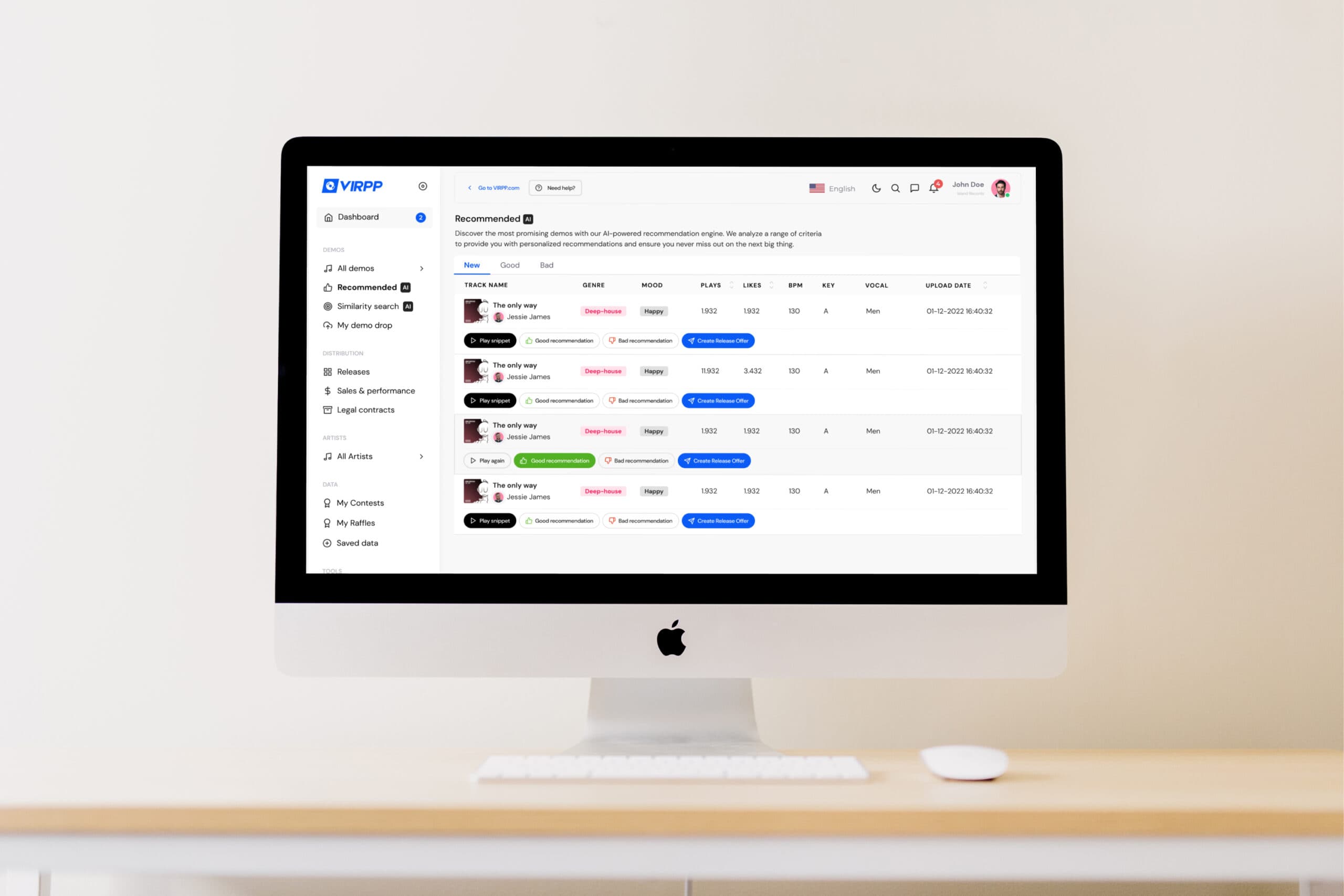
Case | VIRPP
A portal where outside organisations each work in their own environment.
Multi-tenant, like a partner portal
For VIRPP we built the label dashboard: record labels log in and search the catalogue of artists on the platform. Each label works in its own environment, and adding a new label is a matter of configuration, not extra building. Vue.js on a Laravel backend, hosted on AWS.
What it delivers
Several labels have discovered and signed new talent through the dashboard.
Frequently asked questions about B2B portal development
What is a B2B portal?
A B2B portal is a secure online environment for business customers, dealers or partners. They log in, see their own range and agreed prices, order and reorder, track their orders and download invoices. The portal pulls that data live from your ERP or accounting software and puts orders back into it, without anyone retyping them.
What is the difference between a B2B portal and a customer portal?
A customer portal is about self-service: viewing invoices, documents and the status of an order or request. A B2B portal is about ordering: customer-specific prices and ranges, reordering, several buyers per account and orders that land straight in your ERP. In practice they often overlap, and then we build them as one portal.
What is the difference between a B2B portal and a B2B online store?
A B2B online store is a web shop with business features, often on an off-the-shelf platform. A B2B portal is a closed environment for existing customers that shows more than products: agreed prices, order history, outstanding invoices, documents and, for dealers, stock or leads too. If an off-the-shelf platform fits the way you sell, that's what we recommend.
What does B2B portal development cost?
It mainly depends on the integrations and the pricing logic. A portal where customers reorder from their own order history is a different project from one with tiered pricing, contract prices per customer and an approval step for large orders. The cost page for customer portals sets out what drives the price, and the cost check gives you a reasoned estimate.
How long does it take to build a B2B portal?
That depends on the number of integrations, the pricing logic and how many customer groups go in at once. We first go live with a small group of customers and a few features, and build on what they use. The timeline is in the quote.
Can the B2B portal be connected to Exact Online, AFAS or Business Central?
Yes. Prices, stock, customer details and invoices come from your ERP or accounting software, and orders go back into it. We can connect any system, including bespoke or older software. For each integration we agree which data goes back and forth and how often.
What is a dealer portal or partner portal?
A portal for resellers, dealers or partners who sell or install your products. They find stock, price lists, product information and marketing material there, place orders and register leads or warranty claims. Each dealer sees only their own prices and data, even when dealers work in the same portal.
How do you get started with a B2B portal?
With how orders come in now: by email, phone, Excel or WhatsApp, and who retypes them. Then we choose one customer group and a few features for the first version. If you're not yet sure a portal is the right answer, the AI Opportunity Audit first maps out where manual work is getting stuck. That can also conclude that you don't need a portal at all.
Get in touch with us directly. We'll get back to you as soon as we can
Your message goes straight to our team in Amsterdam.
Cookies & privacy. We use functional cookies (always) and analytics and marketing cookies (only with your consent) to improve the site. Read our privacy policy.












 Next.js
 React
React Laravel
 PostgreSQL
 Microsoft Azure