Customer portal development that lets customers help themselves
Customer portal development, the way we do it: orders, invoices, documents and status updates in one place, live from your own systems. Connected to your ERP, accounting software or CRM, with roles and secure sign-in.
★★★★★4.8 from 127 reviews
ISO 9001 & 27001
500 projects delivered
Request #2041customer portal
Submitted by the customer
Documents complete
Under review by the team
Roles and permissions
Customerown files
Reviewerall files
Adminsettings
IntegrationERP
Order created in the ERPNo retyping, no double entry.
IntegrationERP
Order created in the ERPNo retyping, no double entry.
Your customer submits, your team reviews, and the ERP gets it without anyone retyping. See our approach →
What is a customer portal?
A customer portal, also called a client portal, is a secure online environment where customers log in and sort things out for themselves: placing and tracking orders, downloading invoices and documents, and checking the status of a request or support ticket. The portal pulls that information live from the systems a business already uses, such as its ERP, accounting software or CRM. Variants include the B2B ordering portal and the partner or dealer portal. Your Tech Club builds bespoke customer portals from Amsterdam and is ISO 27001 and ISO 9001 certified.
Built for clients including Tata Steel, M&G Investments, Digistore24, Toppers in Concert, Bar-le-Duc and Loogman
Sound familiar?
Why customers still email and phone
Three situations we come across at businesses that are ready for a customer portal.
Customers ring to ask where their order is
The answer is in your ERP, but only your own people can see it. So the customer calls, a colleague looks it up and emails it back.
Invoices and documents go back and forth by email
A copy invoice, a certificate, a signed quote: every time, someone finds it and forwards it. The customer needs it, your team does the work.
Orders arrive as emails or spreadsheets
Regular customers order the same items at agreed prices. Yet someone still retypes every order into the ERP, with the mistakes that come with it.
Recognise any of these?
Explained
Building a customer portal: what to know before you start
The four questions that shape a portal most.
1
What is a customer portal?
A customer portal is a secure environment where your customers log in and handle the things they currently email or phone you about. They see their orders and where those orders are, download invoices and documents, and submit requests or support tickets.
Whether you call it a customer portal, a client portal or a web portal makes little difference. What matters is that the customer finds the answer themselves, and that the answer comes from the same system your team works in.
Ordering, reordering and tracking orders
Downloading invoices, quotes and documents
Checking the status of requests and tickets
Updating their own details and contacts
2
What kinds of portal do businesses build?
The self-service customer portal is the best known. There's also the B2B portal, where business customers order at their own agreed prices, and the partner or dealer portal, where resellers find stock levels, price lists and sales material.
It often starts with one group and a second follows later. That's why we set up roles so a new group can be added without rebuilding the portal.
Customer portal: self-service for existing customers
B2B portal: ordering at customer-specific prices
Partner and dealer portal: stock, prices and leads
Service portal: issues and tickets with status
3
An off-the-shelf module or a bespoke portal?
Some ERP, CRM and accounting packages come with a portal or customer area of their own. If it does what your customers need, use it. It's cheaper and there's nothing for you to maintain. We'll tell you so when we see it.
A bespoke portal pays off when that module doesn't fit the way you work: prices agreed per customer, data from several systems in one view, or an ordering or request process that runs differently for you than it does in the package.
If your package's module fits, that's our advice
Bespoke when data comes from several systems
Bespoke for your own ordering or request process
4
What drives the cost of a customer portal?
Not how it looks, but what sits behind it. The number of roles, the number of integrations, the data that needs migrating and features such as payments or e-signatures account for most of the price.
A portal with a login, documents and one integration is a different project from a B2B portal with pricing pulled from your ERP. On the cost page you answer a few questions and get a well-founded estimate.
Number of user groups and roles
Number and type of integrations
Data that needs migrating
Payments, e-signatures or multiple languages
The choice up front
When a portal beats email and spreadsheets
A portal isn't an end in itself. If you have ten customers who ask something twice a month, a well-run inbox is fine. The balance tips when the same questions come in every day, when customers order from a spreadsheet that someone retypes, or when your team spends more time looking things up than doing the work.
So we start with the questions coming in now. Which come up most, who answers them, and which system already holds the answer? That decides what goes into the first version. Sometimes the outcome is that an integration or an off-the-shelf module is enough.
A portal is only as good as the integrations behind it
A customer portal that keeps its own copy of the data soon falls out of date. The customer then sees a different status from your account manager, and picks up the phone anyway.
That's why your existing systems stay the source. Invoices come from Exact Online or AFAS, customer details from HubSpot or Salesforce, order status from your ERP. Whatever the customer does in the portal goes back into that system, without anyone retyping it. We can connect any system you use.
Your ERP, accounting and CRM stay the source
What the customer does flows back to your systems
Every integration tested on its own, with error handling
At a business customer, it's rarely just one person who logs in. The buyer wants to place orders, accounts wants the invoices, the managing director wants to see everything. And a dealer may see their own price list, but not another dealer's.
We define those roles before a single screen exists. Customers can sign in with email and a second step, or with their own Microsoft or Google account. An administrator at the customer can invite colleagues and choose their role. Who ordered or changed what is logged.
We look at which questions customers ask today, who answers them and which system holds the answer. We also choose which customer group goes into the portal first.
02
Roles, permissions and data model
Who can see and do what: the buyer, the accounts team, your own account manager. We set that out together with the data model, before there are any screens.
03
Design and build in sprints
Design and development run in two-week sprints. After every sprint you see working screens with real data in a test environment.
04
Build and test the integrations
We connect the portal to your ERP, accounting software or CRM and test each integration on its own. If a system is briefly down, the customer sees a clear message rather than an error page.
05
Test with real customers
A few customers use the portal before everyone else gets access. We work their questions and stumbling blocks in before the wider launch.
06
Go-live and further development
We invite customers in groups, keep an eye on how the portal is used and build on what people ask for.
After go-live
MonitoringWe keep an eye on errors, load times and integrations that start to falter.
Access and securityUpdates, reviews of permissions per role, and removing accounts when a customer or employee leaves.
Keeping integrations currentIf the API of your ERP or CRM changes, we update the integration.
Further developmentNew features based on what customers do and ask for in the portal.
Amsterdam
Who you'll talk to
You talk to the founders
No account manager. Your first conversation is with someone who does the work, often with one of the founders. After that you build with a dedicated team from our office in Amsterdam.
The technology follows from what the portal needs to do. These are building blocks we use, and systems a customer portal often talks to.
What we build with
Next.js
React
Laravel
PostgreSQL
Microsoft Azure
What we connect to
Exact Online
AFAS Profit
Business Central
HubSpot
Salesforce
Sign-in with Microsoft or Google
Mollie
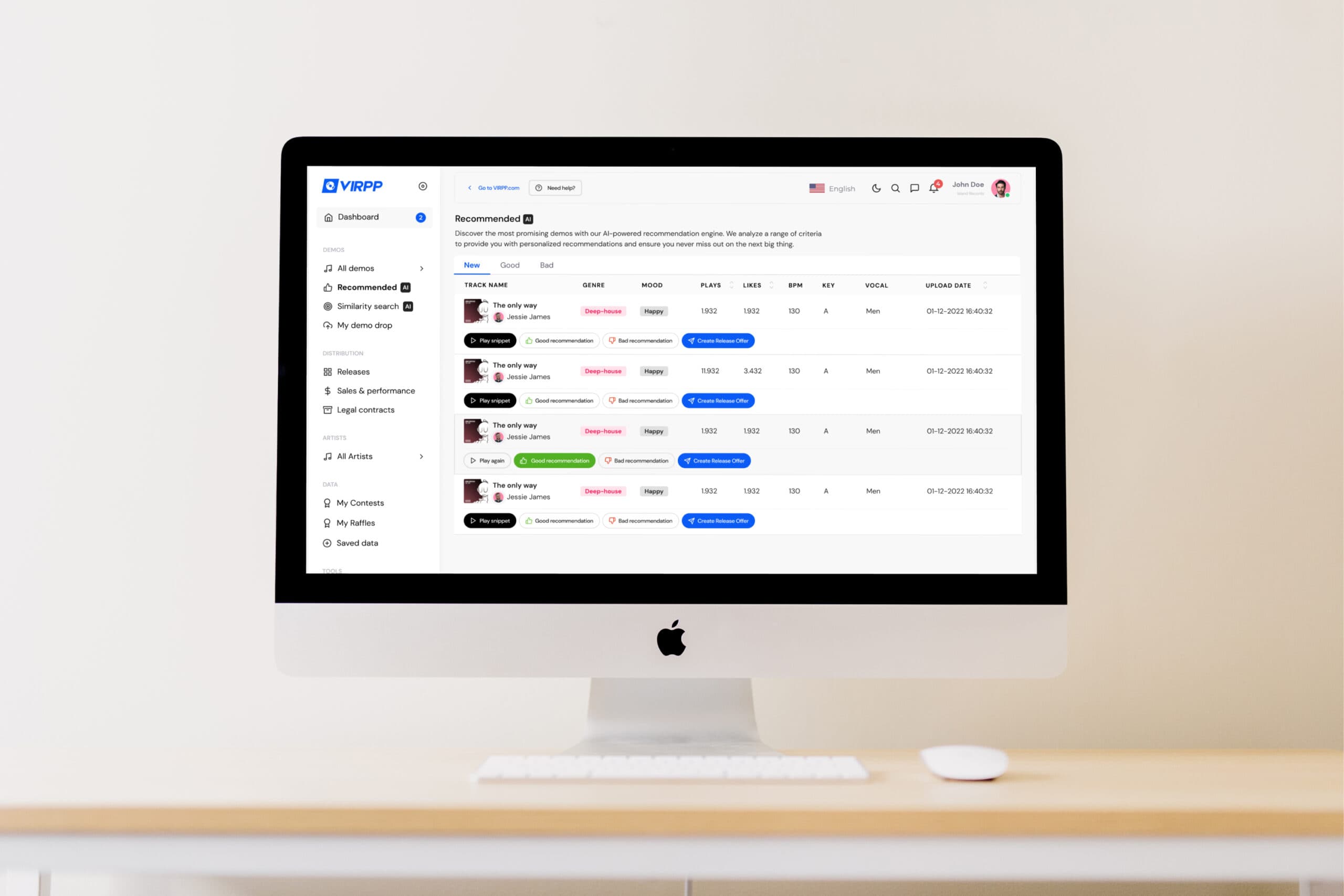
Case | VIRPP
A portal where every record label works in its own environment.
One portal, a separate environment per label
For VIRPP we built the label dashboard: record labels log in and search the artists on the platform. It's multi-tenant, so each label works in its own environment and adding a new label is a matter of configuration, not new development. Vue.js on a Laravel backend, hosted on AWS.
What it delivers
Several labels have discovered and signed new talent through the dashboard. Whatever an artist uploads appears in the dashboard straight away, because both sides run on the same data.
Frequently asked questions about customer portal development
What's the difference between a customer portal, a client portal and a web portal?
Customer portal and client portal are two names for the same thing: a secure online environment where your customers log in to see their orders, invoices, documents and status. Web portal is broader. It covers any portal that runs in the browser, including ones for employees, partners, dealers or suppliers.
How much does it cost to build a customer portal?
Mostly it depends on what sits behind it: the number of roles, the number of integrations with your ERP, accounting software or CRM, and the data that needs migrating. A portal where customers download invoices and documents is a different project from a B2B portal with prices agreed per customer. On our customer portal cost page you answer a few questions and get a well-founded estimate, not a figure from a calculator.
Can a customer portal connect to Exact Online, AFAS or our CRM?
Yes. The portal shows what's in your own systems and writes back what the customer does, so nobody has to retype anything. We can connect any system, from Exact Online, AFAS and Business Central to HubSpot and Salesforce, as well as in-house or older software. For each integration we agree which data moves back and forth, and how often.
What is a B2B portal, and when is it worth building one?
A B2B portal is a portal for business customers. The difference from an ordinary online store: each customer sees their own range, agreed prices, order history and invoices, and several colleagues can work in one account, each with their own role. It pays off when regular customers reorder the same items and those orders currently arrive by email, phone or spreadsheet.
How secure is a customer portal?
As secure as its design. We define who can see what per role, let customers sign in with a second step or with their own Microsoft or Google account, and log who ordered or changed what. Before go-live we test the permissions and the security. Your Tech Club is ISO 27001 and ISO 9001 certified. That certification covers our organisation and the way we work; the requirements the portal itself has to meet are agreed per project.
Where do you start with customer portal development?
With the questions coming in now, not with a feature list. In a first conversation we look at which questions customers ask, who answers them and which system holds the answer. Then we choose one customer group and a few features for the first version. If you're not yet sure a portal is the right answer, the AI Opportunity Audit first maps out where manual work is getting stuck. That can also conclude that you don't need a portal at all.
Does a customer portal work on a phone?
Yes. A portal runs in the browser and we build it to work well on a phone or tablet too, without customers having to install anything. A separate app is only needed for features such as push notifications or working offline, and is a separate project.
Can a portal grow later, for example with a dealer portal?
Yes, if you plan for it from the start. We design the roles and the data model so a new group of users, such as dealers or suppliers, can be added to the same portal. A new group is then a matter of configuration and the screens that go with it, not starting again.
Get in touch with us directly. We'll get back to you as soon as we can
Your message goes straight to our team in Amsterdam.
Cookies & privacy. We use functional cookies (always) and analytics and marketing cookies (only with your consent) to improve the site. Read our privacy policy.















 Next.js
 React
React Laravel
 PostgreSQL
 Microsoft Azure