In this article
- What is process automation?
- What types of business automation are there?
- Which business processes can you automate?
- When do you need AI, and when not?
- How do you automate business processes?
- Which business processes do you automate in each department?
- Which process fits which AI employee?
- What does process automation look like in your industry?
- What does that look like in one process?
- What does it cost to automate business processes?
- Should you automate business processes yourself or outsource it?
- What are the pitfalls of process automation?
- Where do you start?
- Frequently asked questions
To automate business processes means letting software take over the fixed steps of a recurring process: fetching data, checking it, passing it on and recording it. With AI, that also works for work that starts with language, such as an email, a PDF or a WhatsApp message. You start with one process that happens often, automate the predictable steps first and let a person judge the exceptions.
Dutch companies that use AI apply it most often to marketing and sales (35 percent) and to administration and operations (32 percent), according to Statistics Netherlands (CBS) in December 2025 (CBS, December 2025). That is exactly where the repetitive work sits. If you first want to know how to introduce AI in your company at all, read the step-by-step plan for AI implementation.
An example. Orders come in by email, as PDFs and in Excel. Someone reads them, looks up the customer, retypes the order lines and checks the item codes. That work is predictable, but not predictable enough for a simple rule, because every customer sends it slightly differently. That is where AI helps. It does not only follow fixed rules; it also understands language, documents and changing input.
We do not start with the tool, but with the work. Sometimes the outcome is a workflow with an AI step in it. Sometimes a setting in your accounting software does the job, or the process needs a clean-up first. How that clean-up works is explained in process optimisation. If you would rather not build it yourself, read how we approach AI and automation.
What is process automation?
Process automation means software carries out the recurring steps of a work process instead of people. When you automate business processes, the goal is less manual work, fewer errors and shorter waiting times. Ordinary automation follows fixed rules. AI also recognises meaning in emails, PDFs and free text.
For example, a workflow can receive an email, recognise the type of request, pull data from the text and attachments, check it against the CRM, flag missing information, write a draft reply, ask a colleague for approval and record the result.
The AI part is only one step in that chain. Triggers, validation rules, integrations, logging and access rights matter at least as much.
What types of business automation are there?
Roughly five, from simple to complex: settings in software you already have, integrations between systems, workflows, RPA, and AI automation with agents. Choose the simplest form that solves the problem. Because the simpler the form, the cheaper it is to build and the easier it is to maintain afterwards, you save twice.
- Settings and rules in software you already have: an approval limit in your accounting package, an automatic reminder in your CRM.
- Integrations between systems: an order from your online store goes straight to your accounting software, so nobody retypes it. See API integrations.
- Workflows: a fixed series of steps across several systems, built in a tool such as Power Automate, n8n or Make, or in your own software.
- RPA (robotic process automation): software that copies actions on a screen, such as clicking and retyping. Useful for old systems without an integration. The difference with AI is explained in RPA vs AI.
- AI automation and AI agents: a workflow with a step that understands language or documents, or an AI agent that decides for itself which steps it needs.
In practice you combine them. Ordinary automation for the predictable part, AI for the language and a person for the exceptions.
Which business processes can you automate?
You can automate business processes that happen often, mostly follow the same steps and use data that is already digital. Think of processing invoices, following up leads, sorting email, handling work orders and onboarding new employees. However, within such a process you rarely automate everything. Usually you automate a few types of tasks, and a person keeps the rest.
- Collecting input: reading forms, fetching email, saving attachments, extracting data from documents.
- Understanding information: classifying the subject, spotting urgency, summarising, recognising customer numbers and dates.
- Preparatory work: draft replies, structuring quote information, report text, suggestions for CRM fields.
- Checking and flagging: missing fields, unusual amounts, duplicate records, contradictions.
- Passing on and recording: a task to the right team, a document in the right folder, a status update in the CRM or ERP.
Work is less suitable when something different happens every time, when the data is not digital, or when a mistake has serious consequences and is hard to check quickly. How to weigh candidates against each other is covered in which business processes suit AI.
When do you need AI, and when not?
You need AI when the input varies and you have to understand what it means. If the rules are fixed and the data sits in fixed fields, ordinary automation is faster, cheaper and easier to check. Often you combine both in one workflow, with a person handling the exceptions that neither can judge well.
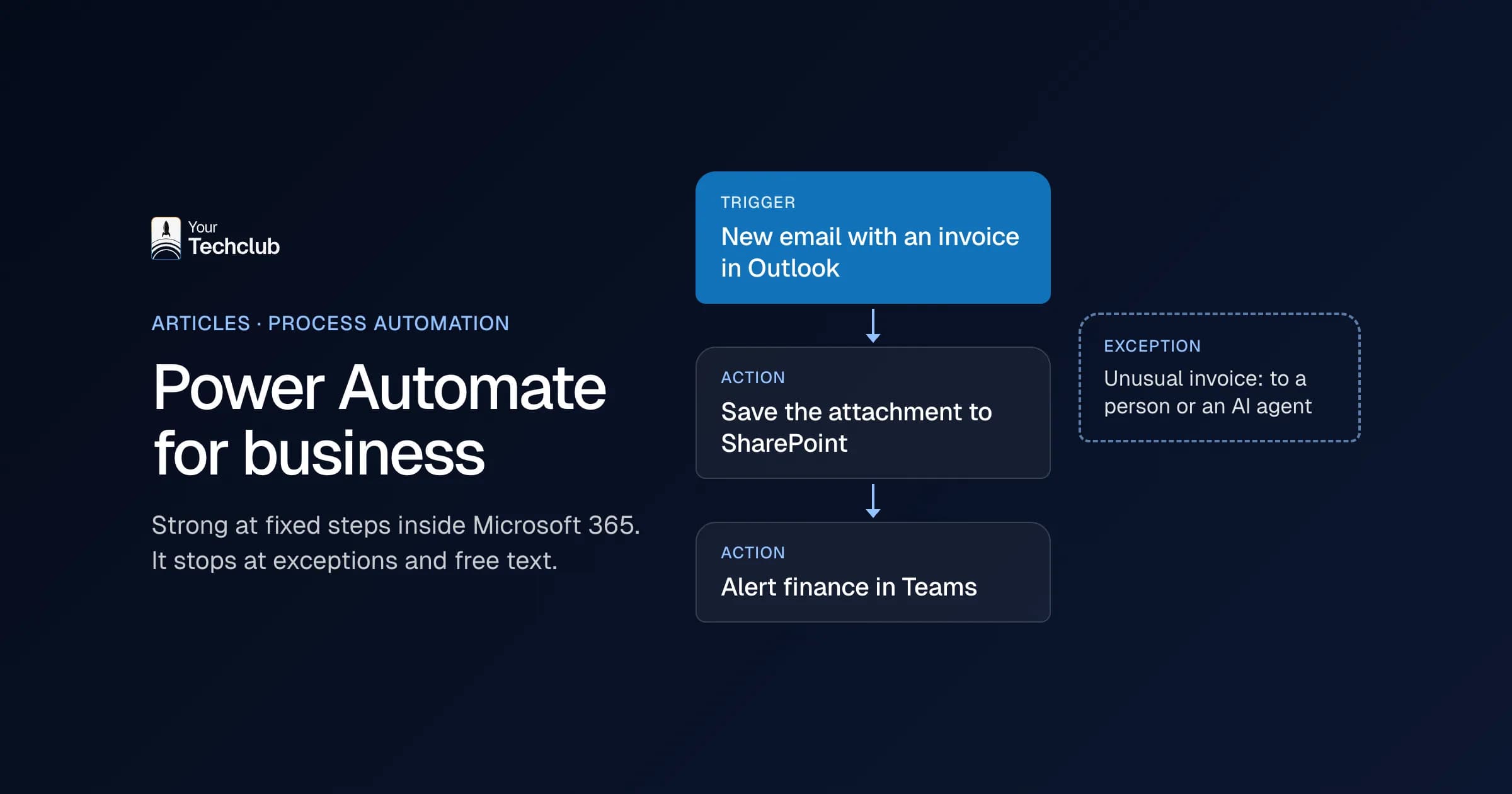
AI earns its place when you automate business processes with messy input. Think of customers who ask the same question in different words, invoices with different layouts, or information that appears in a different place in every document. For example, a rule decides whether an amount is above the limit, AI reads the explanation and a colleague judges the exception. More on that choice in AI agent vs automation. If you work in Microsoft 365, also read Power Automate for business.
How do you automate business processes?
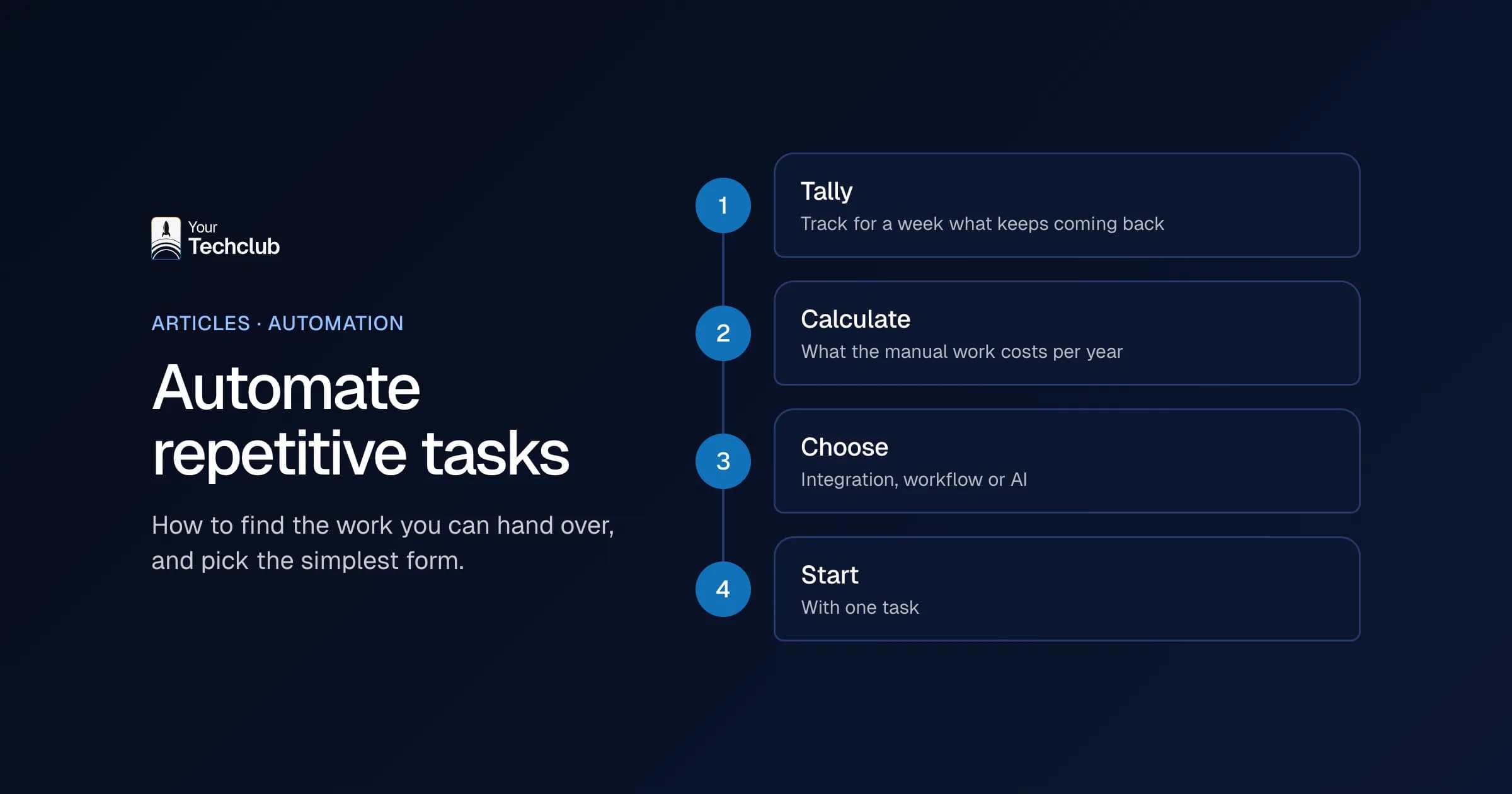
You automate business processes in nine steps, one process at a time. You do steps 1 to 5 before you choose a tool: map the process, split it into tasks, measure it, pick one goal and draw the workflow. Teams that start with the tool tend to automate the process as it runs today, detours included.
1. Map the current process
Describe the start and the end, who is involved, which systems you use, where decisions happen, where work waits and which exceptions exist. Then watch the real work. The process description from management rarely matches daily practice.
2. Split the process into tasks
"Automating the quoting process" is too broad. So split it up: receive the request, identify the customer, decide on the service, ask for missing information, calculate the price, write a draft, approve, send and follow up. Then assess each task separately. Some suit rules, some suit AI and some stay human work.
3. Measure how it runs now
Volumes, time per item, waiting time, errors, rework, handovers and the share of exceptions. Ideally, use a few weeks of representative data. See what manual work costs for the calculation.
4. Pick one goal
For example: shorten the time to the first reply, flag missing data before anyone starts, or remove manual entry in one system. Not ten goals at once in the first version.
5. Draw the workflow
Trigger, access control, data validation, the AI step, rules, human approval, the action in the system, logging, error handling and monitoring. Draw all of that before you choose a tool.
6. Choose the tooling
A low-code platform such as Power Automate, n8n or Make, your own backend, document recognition or a language model through an API. The choice depends on volume, security, maintenance, existing licences and how much flexibility you need. The differences are in n8n, Make or Zapier. If an AI assistant needs access to your own systems, that often runs through an MCP server. See for example connecting Exact Online to ChatGPT and connecting AFAS to Claude. Exact Online and AFAS are widely used Dutch accounting and ERP packages.
7. Test the exceptions
Missing information, other languages, unusual documents, duplicate requests, poor scans, confidential information and messages that try to mislead the workflow. The tidy cases usually work anyway.
8. Start with human approval
Let a colleague check before the workflow sends anything out or makes a final change in a system. Also record for each correction what went wrong, why and how serious it was. That way you get an improvement list instead of loose complaints.
9. Measure and scale
Compare against the baseline on time, waiting time, quality, escalations, cost per item and incidents. Only scale up once the application runs stably and maintenance is in place.
Which business processes do you automate in each department?
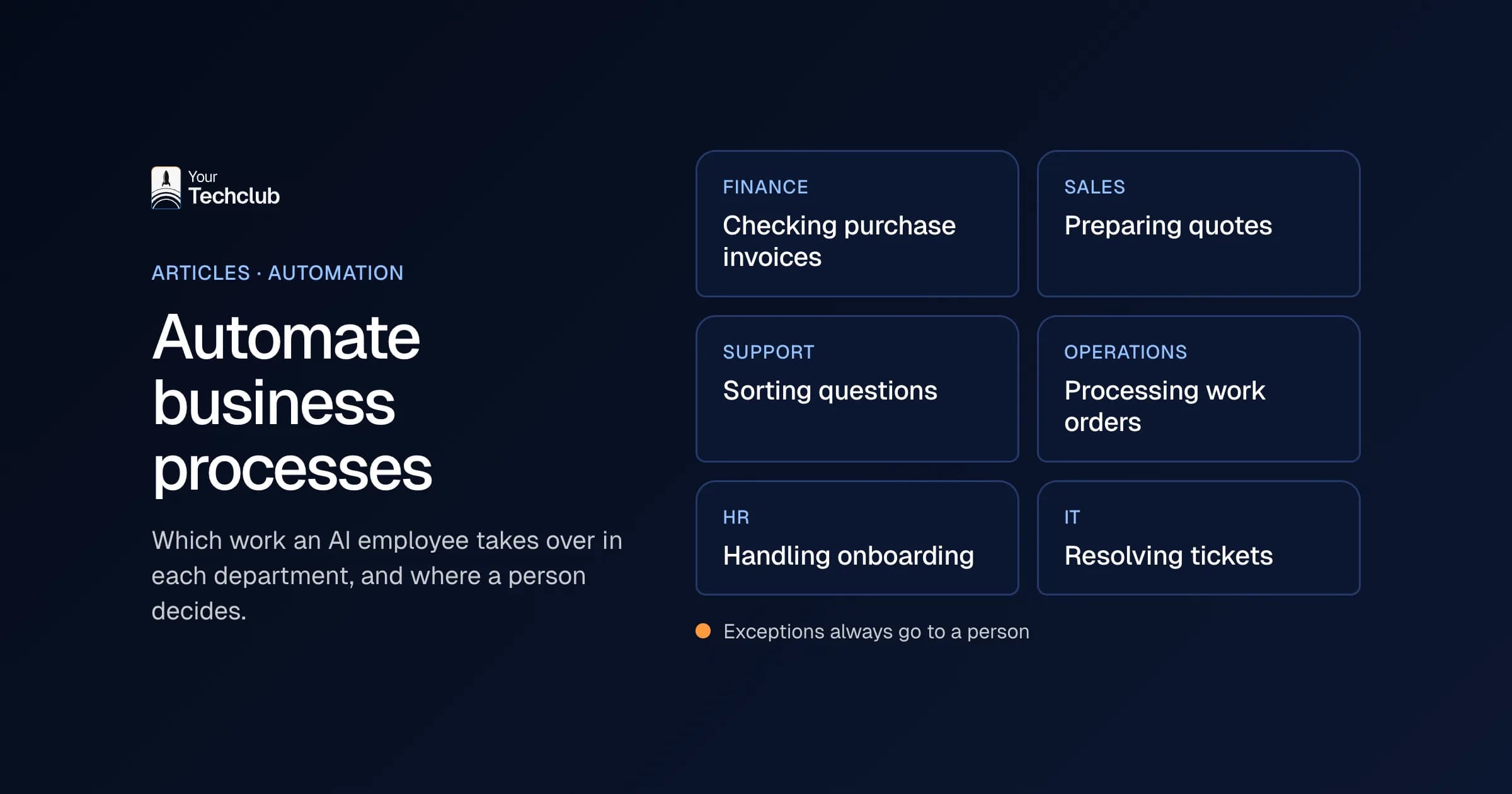
When you automate business processes, every department has work that comes back daily: invoices in finance, quotes in sales, questions in support, work orders in operations. Below you find two examples per department, the AI employee that covers the process and the integration with the system where the work ends up.
Finance and administration
- Purchase invoices: the invoice arrives in a dedicated mailbox, an AI step reads the supplier, amount and VAT, a rule matches it to the purchase order and only the mismatches go to an employee.
- Accounts receivable: reminders at set moments, in a tone that suits the customer, with the open items from your accounting software. Anything that needs a conversation or a collection agency goes to a person.
Worked out as an AI employee: the AI invoice checker and the AI accounts receivable monitor. The integration with your accounting software: Exact Online, AFAS or Twinfield, three common Dutch accounting packages. See also automate invoice processing and accounts receivable automation.
Sales
- Leads: a request through the web form gets enriched with what you already know, scored on fixed criteria and placed in the CRM with a suggested follow-up.
- Quotes: the workflow summarises the request, flags missing information and prepares a draft from your own text blocks. The prices come from your own system, not from the language model.
Worked out as an AI employee: the Lead follow-up assistant and the AI quote assistant. Integrations: HubSpot, Salesforce and Pipedrive. See also create quotes with AI.
Customer service
- Sorting questions: a new email or ticket gets a subject and an urgency and lands with the right team. Standard questions get a draft reply from your own knowledge base.
- Orders from email and WhatsApp: loose orders become structured orders in your system; unknown items go to an employee separately.
Worked out as an AI employee: Support triage and the WhatsApp order processor. See also automate customer service with AI. If you want it built for email, chat and WhatsApp, that is our AI customer service service.
Operations and planning
- Work orders: the engineer's job sheet becomes invoice lines, and anything incomplete goes back with a specific question.
- Shared mailbox: info@ and planning@ get sorted, standard questions answered and the rest assigned to the right person.
Worked out as an AI employee: the Work order processor and Shared inbox triage. For email and calendar you connect Microsoft 365 or Google Workspace. See also job sheet automation for installation companies.
HR
- Onboarding: a new employee in the HR system triggers accounts, access and the preparation of their first working day.
- Staff questions: questions about leave and working from home get an answer from your own policies, and the rest goes to HR.
Worked out as an AI employee: the Onboarding assistant and the HR helpdesk. Integrations: AFAS, Nmbrs and Loket.nl, the last two being Dutch payroll software. See also automate HR processes.
IT and service desk
- Recurring tickets: passwords, printers, access to a folder. The workflow handles simple tickets itself and passes the rest to a specialist, complete.
- Joiners and leavers: when a colleague joins or leaves, the workflow sorts out accounts and rights, and it flags access that nobody needs any more.
Worked out as an AI employee: First-line service desk and Access management. Integrations: TOPdesk, a Dutch service desk tool, and Microsoft 365.
Which process fits which AI employee?
Each department has three to five processes that almost every company runs. The table shows which work you can automate, which AI employee does it and where to read more. An AI employee is a worked-out role: one task, in your systems, with fixed limits and a person for the exceptions.
All 62 roles are listed under AI employees.
What does process automation look like in your industry?
Even when you automate business processes that every company has, they look different in each industry. An installer has work orders and a handover file, a staffing agency has placements and hours, a leasing company has quotes per licence plate. For each industry we describe which work pays off most and which systems usually come with it.
- Installation companies: work orders, planning and the Wkb handover file, required under the Dutch Building Quality Act.
- Recruitment and staffing agencies: from placement to invoice, see staffing agency automation.
- Car leasing: the quoting process in car leasing.
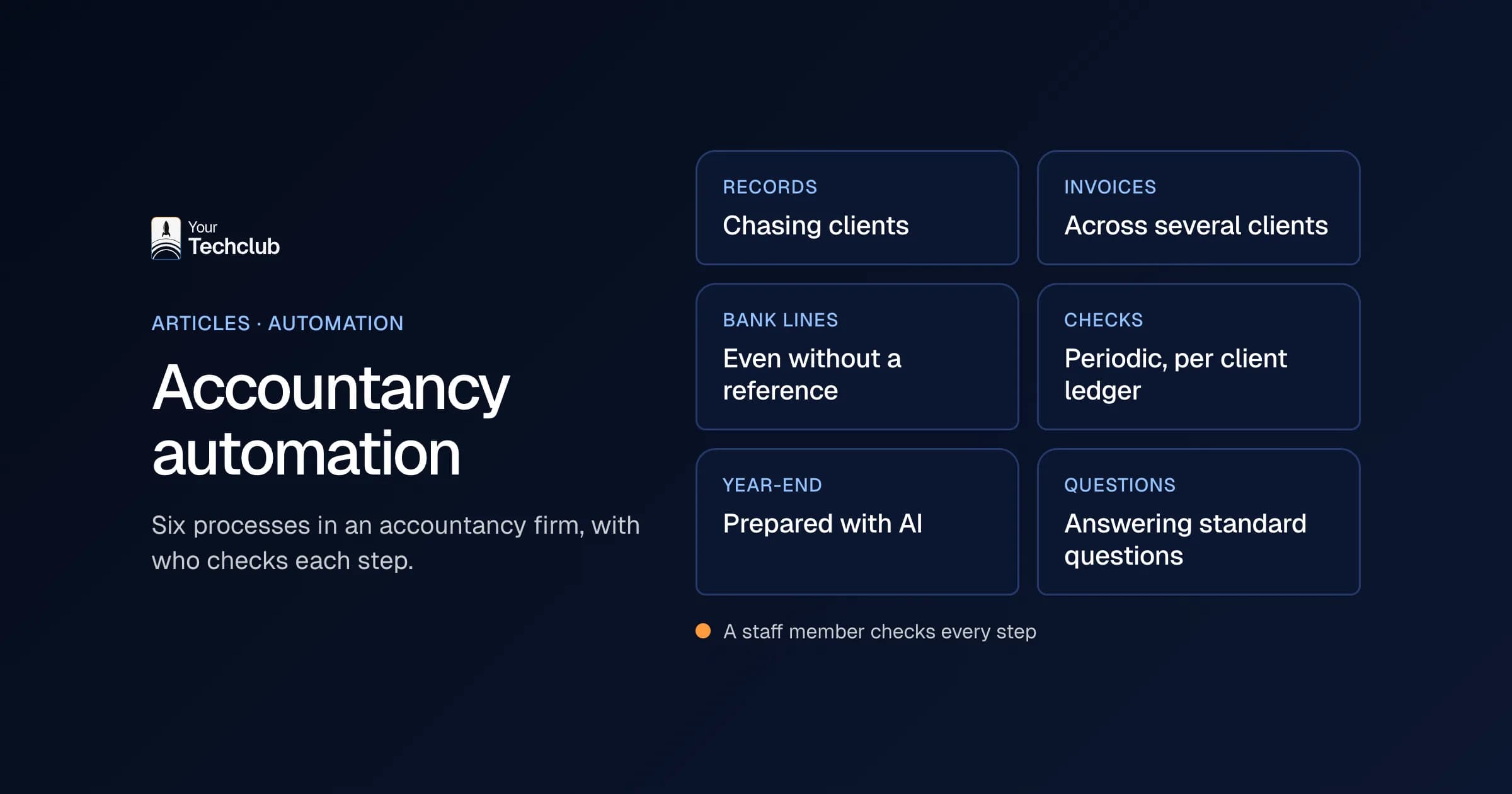
- Accountancy: administration and checks for several clients at once.
What does that look like in one process?
Take order processing at a wholesaler, as an illustrative scenario. The first workflow saves the attachment, recognises the customer and order number, extracts lines and quantities, checks the required fields and compares item codes with the item master. Unknown codes go to an employee, and the rest becomes a draft order.
A colleague checks the order, so the workflow does not post anything on its own. The first version mainly takes away the searching and retyping. Only when the results have been stable for a while do standard orders go through without a check. The full version is in automate order processing and in the AI employee AI order entry.
What does it cost to automate business processes?
What it costs to automate business processes depends on the number of systems you connect, the number of exceptions and your requirements for security and maintenance. A workflow on one mailbox is a different project from a process that updates three systems. So always put the cost next to what the work costs today.
The costs sit in analysis and design, integrations, build, testing, security, licences or API usage, your own time and maintenance afterwards. On the other side is the current work: hours times hourly cost, plus rework and whatever gets left undone. An indication per type of project is in what an AI solution costs. How to set returns against costs is explained in the AI business case.
Should you automate business processes yourself or outsource it?
You can automate business processes yourself for simple workflows between standard software packages, if someone in-house has time for it. Outsourcing makes more sense for integrations with your ERP, sensitive data, many exceptions, or when maintenance should not depend on one colleague who might leave next year.
No-code tools such as n8n, Make, Zapier and Power Automate take you quite far. However, they get stuck on complex rules, high volumes, deeper integrations or strict requirements for logging and access rights. Either way, keep ownership in-house. A partner can build and speed things up, but you judge whether the outcome is good enough. What to look for is in choosing an AI implementation partner.
If you are torn between outsourcing the work and automating it, the buyer's guides on outsourcing bookkeeping and payroll, outsourcing accounts receivable and outsourcing customer service help. If your main problem is too few people, read coping with staff shortages.
What are the pitfalls of process automation?
When you automate business processes, most problems do not come from the technology but from what is missing around it: checks, access rights, logging and a clear process. A bad process that you automate only becomes bad faster. We see these five pitfalls most often.
- Wrong output. AI sounds convincing, even when information is missing. So use source references, validation rules and human checks. See prevent AI hallucinations.
- Too much access. Give the workflow only the data and actions it needs.
- Invisible errors. Log the input, the decision, the output and the human corrections.
- Unclear ownership. Automation does not fix that. How to clean up a process first is in process optimisation.
- Dependence on one supplier. Document prompts, rules, integrations and data models.
Sometimes the conclusion is that automating does not pay off right now. When that happens is covered in when not to use AI.
Where do you start?
To automate business processes, start with one process that happens often, with data that is already digital and an owner who has time for it. First measure what it costs now, then automate the predictable steps and let a person judge the rest. Only when that runs stably do you pick the next process.
Not sure yet which process should go first? Then the AI Opportunity Audit puts your processes side by side in five working days: what they cost now, what is feasible and where automating does not pay off. The build itself falls under AI and automation. An overview by department is in AI applications for business.
Frequently asked questions
What is process automation?
Software carrying out the recurring steps of a work process instead of people: fetching data, checking it, passing it on and recording it. With AI, that also works for work that starts with email, PDFs or other free text.
Which processes can you automate?
Processes that happen often, have fixed steps and use data that is already digital: processing invoices, following up leads, sorting email, handling work orders, onboarding new employees. Work where something different happens every time is less suitable.
How do you start automating processes?
With one process that has enough volume, clear data, limited risk and an owner. Map it, measure how it runs now, pick one goal and first automate the steps that always go the same way.
What is the difference between process automation and process optimisation?
Process optimisation improves the process itself: removing steps, making exceptions unambiguous. Process automation lets software carry out the steps that remain. Do it in that order, or you automate the detours as well.
Do you always need custom software?
No. Many simple workflows start with existing integrations and low-code tools. Custom work makes sense for complex rules, high volumes, deeper integrations or strict maintenance requirements.
Sources
- Companies using AI above all for marketing or sales, CBS (Statistics Netherlands)