

AI agent dashboard for a retailer: who does what, and when do they stop?
How we built an AI agent dashboard for a retailer: every agent has a task, fixed limits and a log. And a human is always in control.
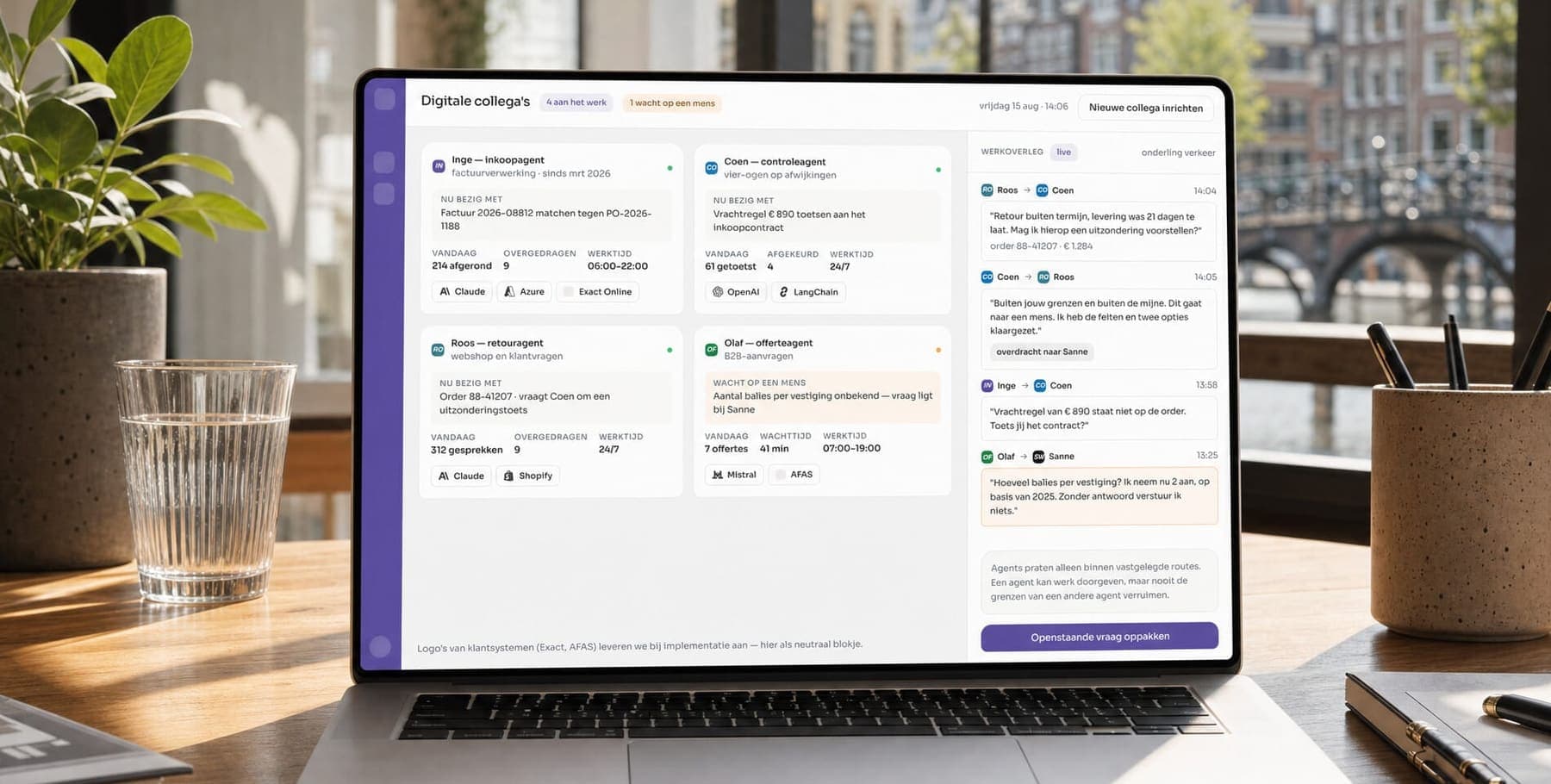
For a retail organisation, we built an AI agent dashboard. Every agent in it has a task, fixed limits and a log. And a human always keeps watch. At their own request, the client stays anonymous, but you may well recognise the problem.
Our client was running several automations side by side. Each one had its own set-up, but there was no shared overview. Nobody could say what an agent had done that day or who had switched it on. And what happened when it got stuck? Nobody knew that either. We built an overview that treats automation as a team, not as a collection of loose scripts.
The project in brief
- Client
- A retail organisation (anonymous).
- Sector
- Retail.
- What we did
- UX/UI design, web application development, AI implementation and the data and AI work.
- Technology
- Next.js, Claude, OpenAI, LangChain and Azure.
What was the challenge?
The automations did their job, but nobody could see them. There was no central place showing which agent was active and what it was working on. It was also unclear what happened when an agent ran into a situation it was not allowed to handle itself.
For a team lead, that meant piecing things together afterwards instead of following along live. For the organisation, it meant something else: a growing number of automations without a clear owner or clear limits.
That last point is the real risk, in my view. One script without an owner is a problem. Ten scripts without an owner is a department nobody manages. Yet you see this a lot, because each automation looked like a small, logical project on its own.
Why did we choose this approach?
We treat every agent as a digital colleague. It gets a name, a concrete task, fixed working hours, a manager and defined permissions. That way you ask an agent the same questions you would ask a new employee: what do you do, for whom, and what are you not allowed to decide yourself?
My view: as long as you see an agent as a piece of code, you ask the wrong questions. You only ask whether it works. With a colleague, you ask who manages them and where their authority ends. That second set of questions is what keeps an organisation safe.
That is why human oversight sits at the centre. Agents pass work to each other along predefined routes, but they can never widen each other's limits. If a situation falls outside an agent's limits, the case goes to a person automatically. The relevant facts are already attached. Want to understand what an agent actually is first? Read what an AI agent is.
Are you also running loose automations without an owner? We help you build AI agents with fixed limits and a log from day one.
See how we build AI agentsHow did we build the AI agent dashboard?
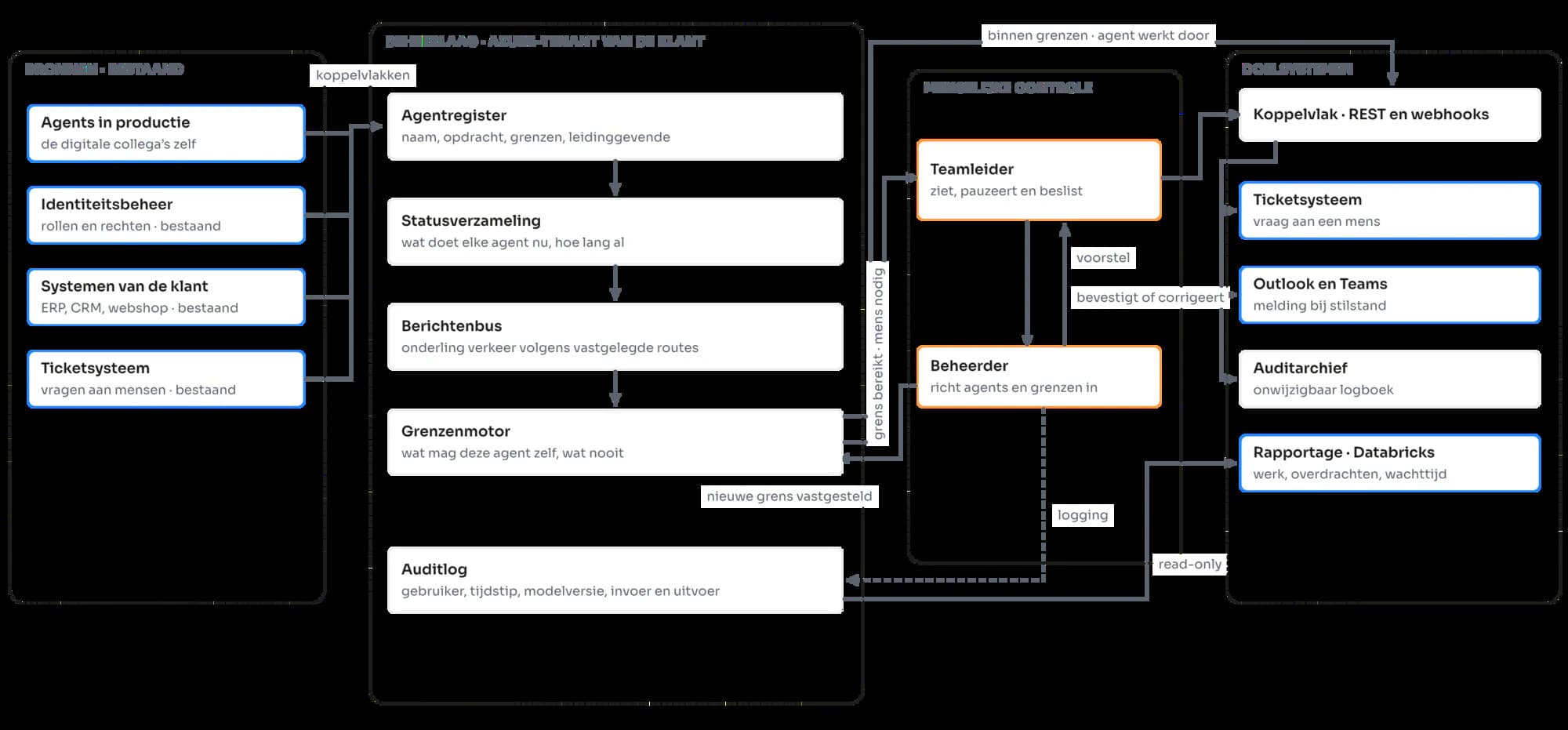
As a dedicated layer within the client's Azure tenant. That layer consists of an agent registry, a status store, a message bus and a rules engine. The client's existing systems simply stay where they are. The dashboard integrates with them, but replaces nothing.
What are its parts?
- Agent registry: the name, task and limits of each agent.
- Status store: tracks what each agent is working on right now.
- Message bus: handles traffic between agents along fixed routes.
- Rules engine: decides per agent what it may do itself and what it may never do.
Systems such as the ERP, CRM, online store and ticketing system stay in place. That was a deliberate choice, because nobody wants a migration just because you want to manage your agents better.
How is human oversight ensured?
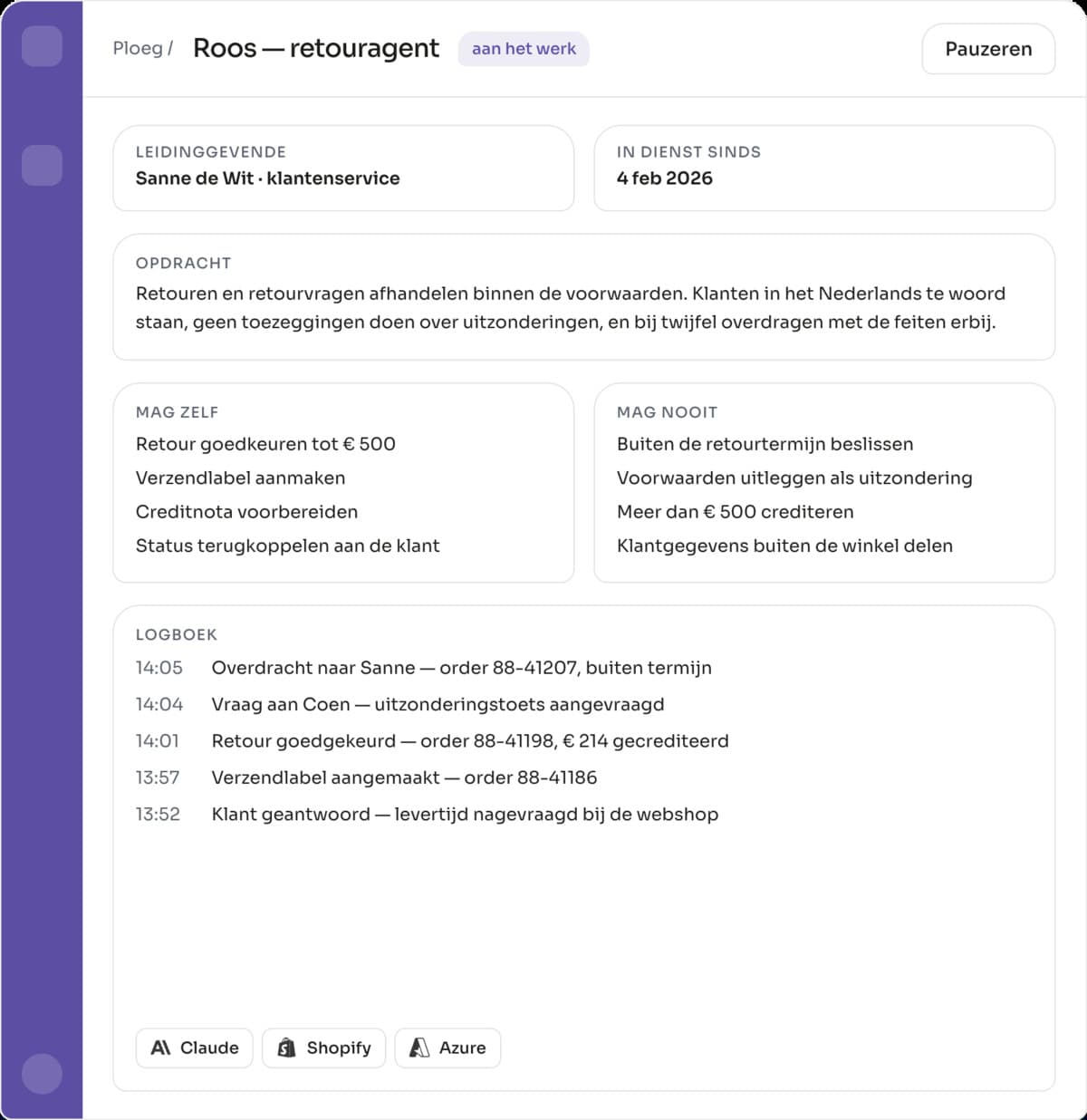
Every agent has an explicit list of what it may decide itself and what must always go to a person. Those limits are set in the rules engine, not scattered across loose scripts. So you can check and change them in one place.
Can decisions be traced afterwards?
Yes. Every action, handover and decision goes into an immutable audit log. It records who did something, when, with which input and with which output. That keeps the agents' work visible, even weeks later.
For the agents themselves, we use Claude, OpenAI and LangChain. The front end runs on Next.js. Curious what a project like this roughly costs? Take a look at the cost of building an AI agent.
What does the design look like?
A team lead sees on one screen whether work is flowing. For each agent, you see what it is working on, what it has handed over to another agent and when it needs a person. A detail screen shows the task, permissions and log of one digital colleague.
That detail screen is really a personnel file. I like that comparison, because it shows exactly what we wanted to achieve. You are not looking at code, you are looking at someone with a task and a limit.
What does the AI agent dashboard deliver?
First of all, oversight instead of detective work. A team lead sees live whether work is flowing, instead of reconstructing it afterwards from separate systems. What an agent may and may never decide on its own is fixed and can be checked. And every action can be traced to a moment, an agent and the data behind it.
You see a similar approach in our case on an AI assistant for the SUGB form. There too, every answer shows its source, so a person can check what the AI did.
Want to know which agents you really need? In five working days, we map out where AI saves time and money, and where it does not.
Book your AI auditUpdated

Get in touch with us directly. We'll get back to you as soon as we can


 Your message goes straight to our team in Amsterdam.
Who built this AI agent dashboard?
Your Tech Club. We did the UX/UI design and developed the web application. We also set up the agent registry, the rules engine and the audit log within the client's Azure tenant.
What did Your Tech Club build for this retail organisation?
An overview layer on top of existing automations. Every AI agent gets a name, a task, fixed working hours, a manager and explicit permissions. A team lead sees live what is running and where a person is needed.
What technology does the dashboard run on?
Next.js on the front end, with Claude, OpenAI and LangChain for the agents themselves, hosted in the client's Azure tenant. The existing systems stay where they are; the overview layer integrates with them.
How do you keep human control over AI agents?
By setting down, per agent, what it may decide itself and what always goes to a person. You manage those limits in one place instead of scattered across scripts. If a situation falls outside the limits, the case goes to a person, with the relevant facts attached.
Can an AI agent's decisions be traced afterwards?
Yes. Every action, handover and decision goes into an immutable audit log with who, when, which input and which output. That makes it possible to reconstruct afterwards why an agent did what it did.