

De Duurzame Jongens: a quote tool with CRM integration that reports back
How we built a quote tool with CRM integration: a price estimate in four steps, requests in Sollit and conversions sent back to Google Ads and Meta.
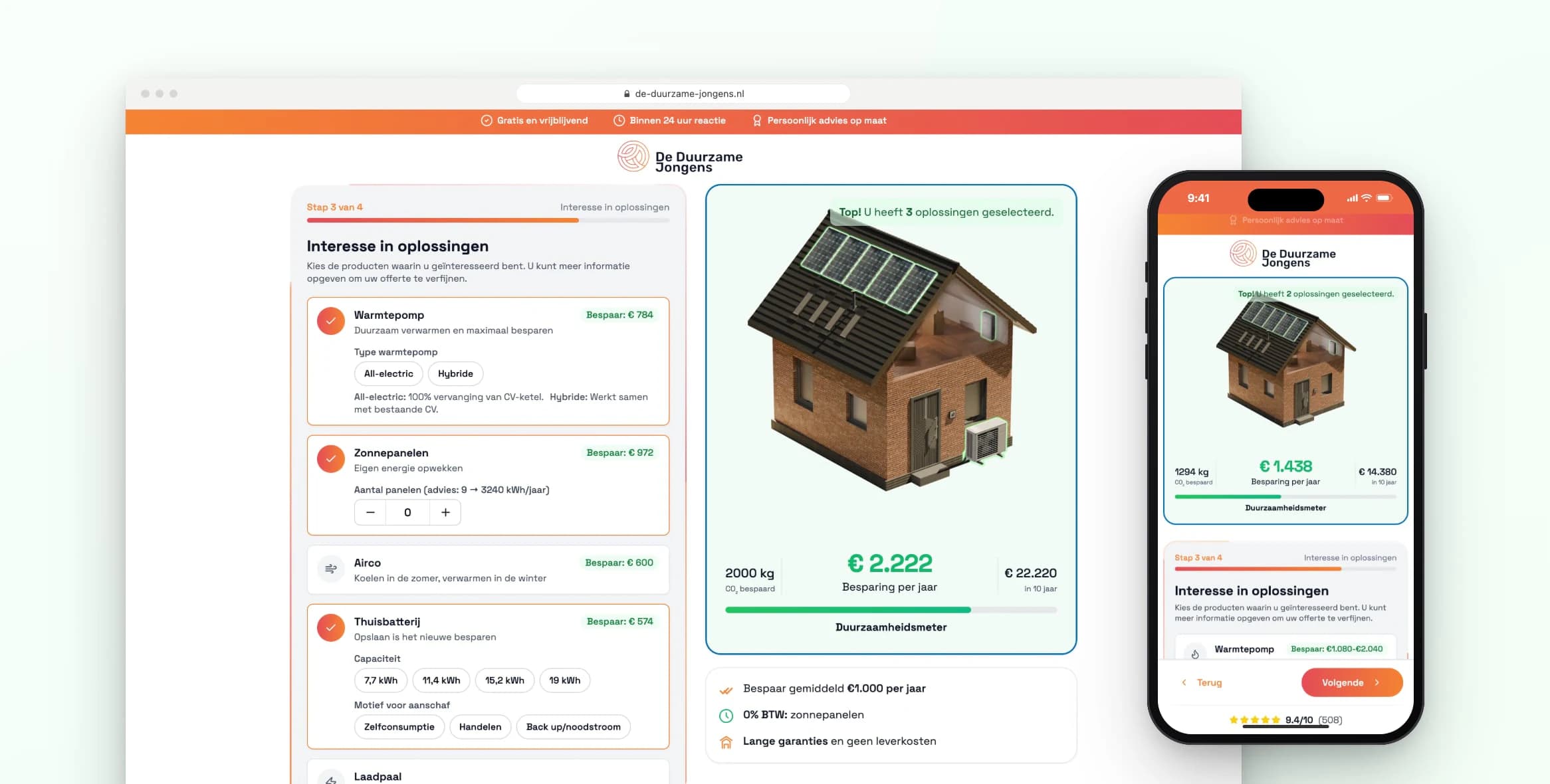
For De Duurzame Jongens we built a quote tool with CRM integration. In four steps, visitors see what making their home more sustainable costs and saves. Their request arrives complete in Sollit, their CRM. And what happens next is reported back to Google Ads and Meta.
De Duurzame Jongens install solar panels, heat pumps, home batteries, air conditioning and EV chargers. Anyone who requests a quote on their site first wants to know what it costs. The pricing model for that already existed. It was just in Excel, where no visitor could see it.
The project in brief
- Client
- De Duurzame Jongens, installer of solar panels, heat pumps, home batteries, air conditioning and EV chargers.
- Sector
- sustainable energy and installation.
- What we did
- quote tool with price estimate, pricing model from Excel to code, short entry form, integration with Sollit, checks for duplicate and abandoned requests, offline conversion tracking and an admin environment in WordPress.
- Technology
- React, TypeScript, Vite, Tailwind CSS, WordPress plugins in PHP, Gravity Forms, Sollit API (formerly 2Solar), Meta Conversions API, Google Ads API, Google Tag Manager and Complianz.
What was the challenge?
There were two problems. First, the pricing rules were in a spreadsheet: installation prices by number of panels, mounting systems, inverters and savings per product. Second, Google Ads and Meta only saw a completed form. Whether a request led to an advice appointment or a signed quote was recorded in Sollit. So the platforms were optimising for forms instead of customers.
I come across that second problem more often. Everyone looks at the form, almost nobody looks at what happens after it.
Why did we choose a quote tool with CRM integration?
Because a standalone form is only half the story. We looked at the whole route, from click to signed quote. A visitor clicks an ad, works out their situation and requests a quote. The team receives that request complete in Sollit. And when its status changes there, the ad platforms hear about it.
That line is what sets this project apart from an ordinary quote module. For a rough idea of what an integration like this costs, see the cost of an integration.
How does the quote tool work?
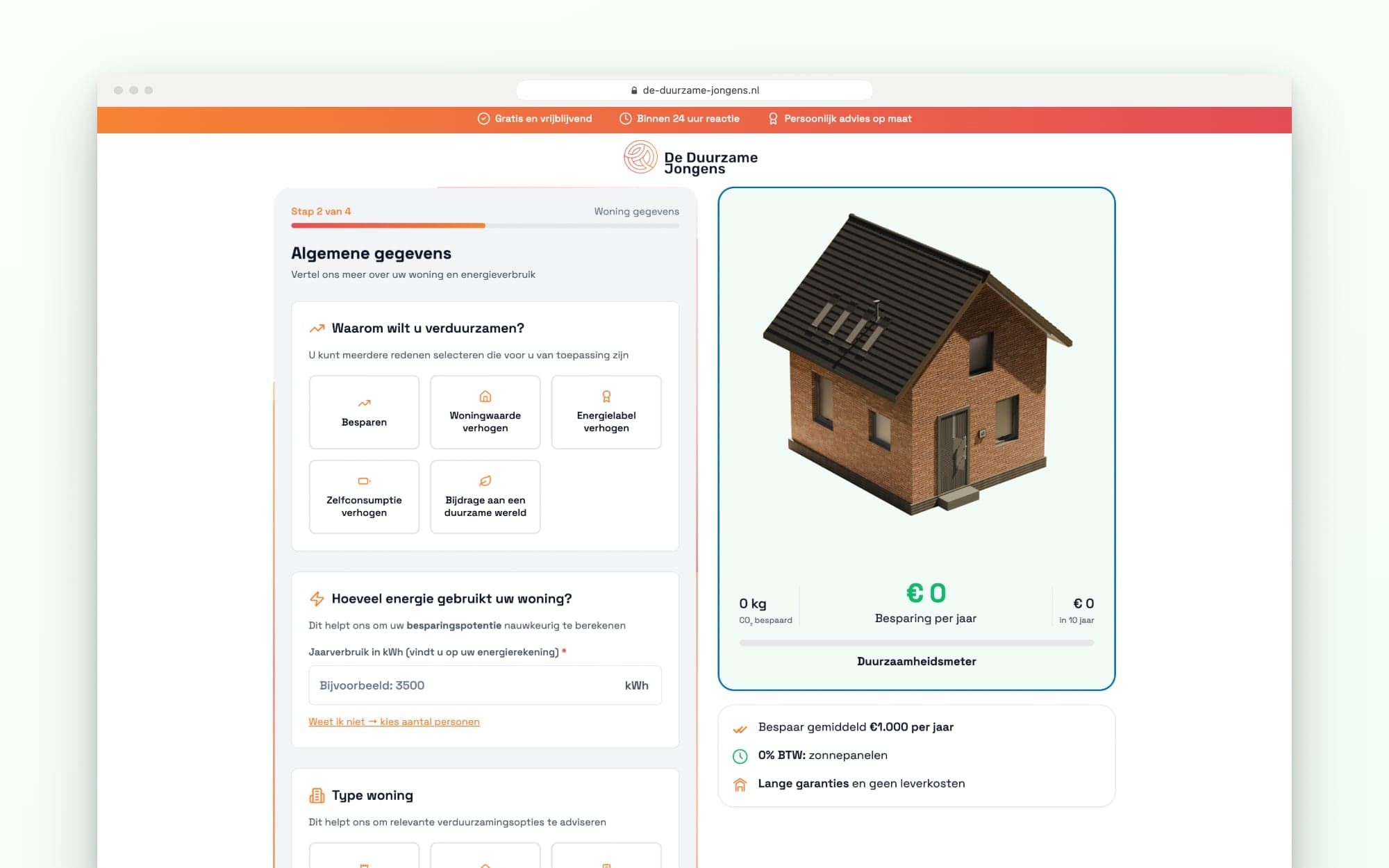
The quote tool works in four steps. First the visitor enters their contact details, then their home and energy use, then the products, and finally they see the price estimate. The contact details come first on purpose. That way a request is already in after the first step, even if someone stops after that.
In step two, the visitor chooses their reason for going sustainable, such as saving money or increasing the value of their home. They also enter the type of home and their annual energy use. If they don't know it, they enter the number of people in the household and the tool calculates with an estimated figure.
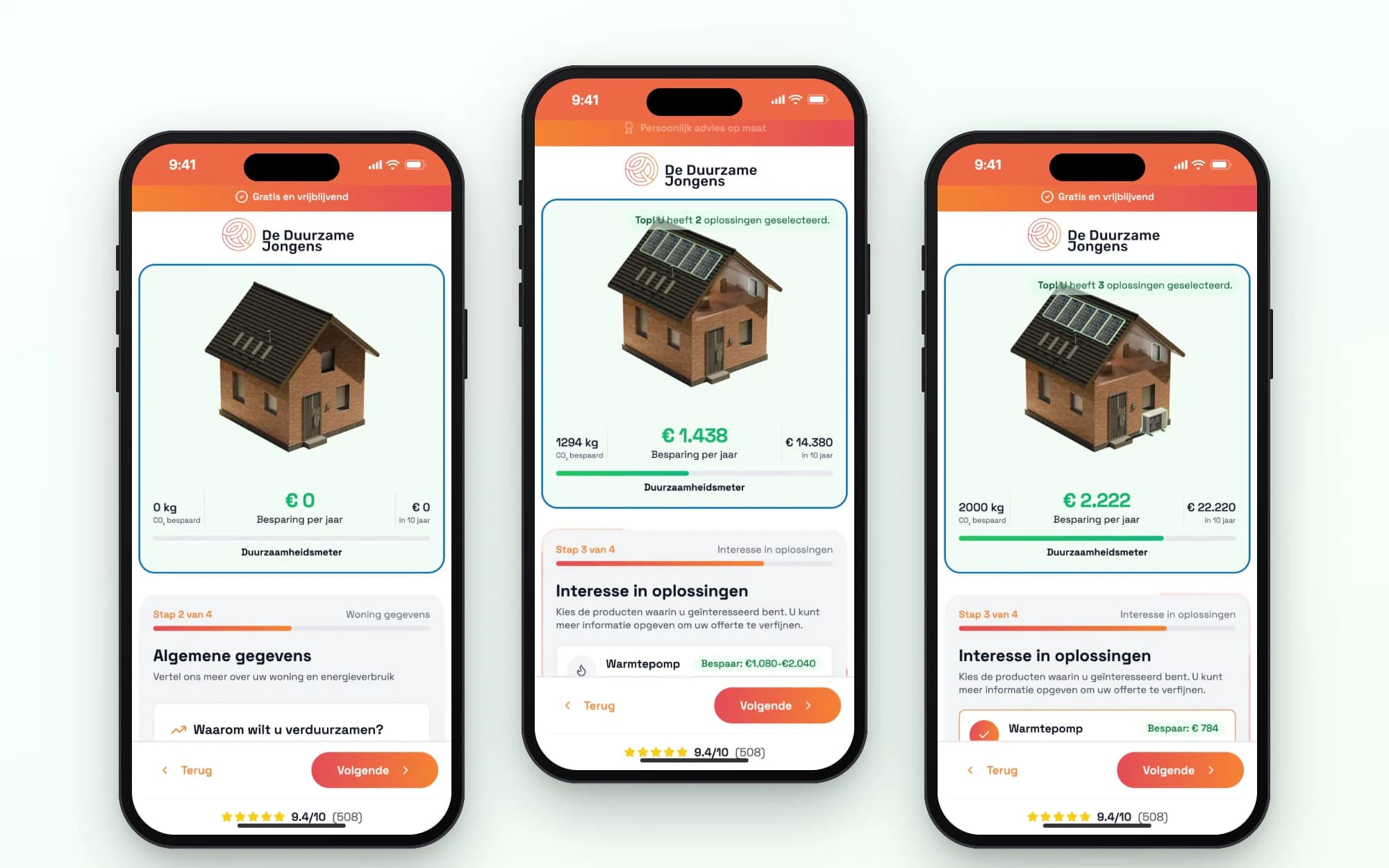
In step three, the visitor sets the key options for each product. Think of the number of panels, hybrid or all-electric, or the battery capacity. For solar panels, the tool gives a recommendation based on energy use.
The final step shows the total investment, the savings per year and a monthly amount with financing over fifteen years. Anything not yet chosen is listed below, with what it would save.
The pricing model, in code
We converted every pricing rule from the Excel model into code, product by product. For solar panels, installation costs rise in steps with the number of panels. For a heat pump, the price depends on the type and the household. An EV charger has a fixed price. VAT also follows the Excel model.
A document explains every pricing rule, with the tab and column in Excel alongside it. That lets the team check where a number comes from. To me, that's one of the most important parts. A calculator nobody can check is one nobody trusts after six months.
Want your own pricing model to work online? We build it as a web application, integrated with your CRM.
See web application developmentWhat does the design look like?
Next to the form is a 3D house that builds along with you. Choose solar panels, a heat pump, an EV charger or a home battery, and a short animation plays as the product appears on or next to the house. Below it, the savings per year and over ten years update as you go. On a phone, the house sits above the form.
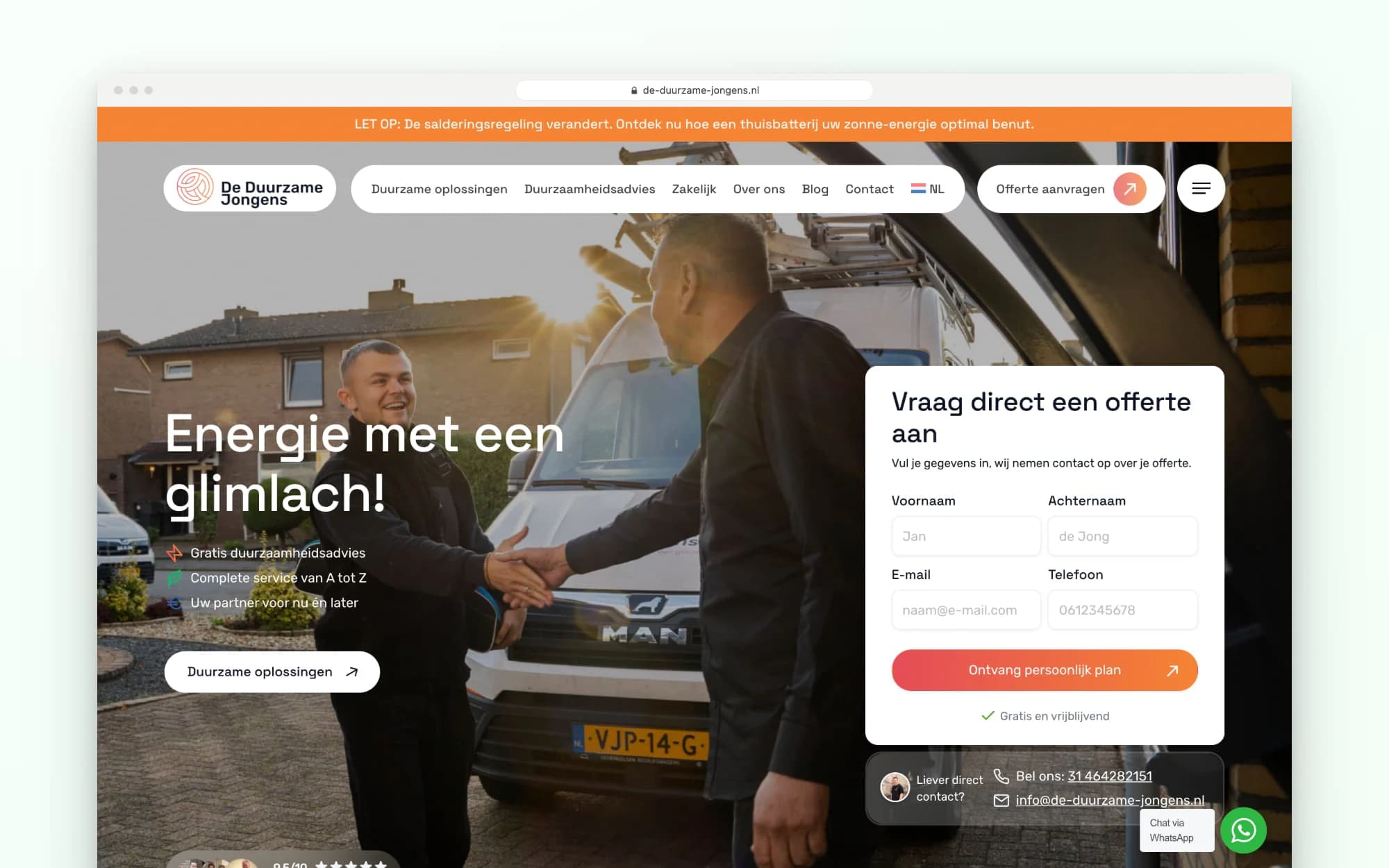
The homepage and product pages also have a short form with name, email and phone number. After submitting, the visitor moves on to the calculation, with what they already filled in ready and waiting.
How does a request get into Sollit?
A request first arrives in a custom WordPress plugin. It stores the request, checks the data and then puts it into Sollit. There, a contact is created, with a separate request for each chosen product. The note contains the home, energy use, products, price estimate and the preference for phone, email or WhatsApp.
So whoever calls the customer already has all of that in front of them. If a visitor who came in after step one later completes the tool, they would end up in Sollit twice. The plugin recognises this from the same email address, postcode and house number within a short time. It then adds to the existing request.
If Sollit doesn't respond for a moment, the request stays in the queue and the plugin tries again after a few minutes. If it still fails, it's marked as failed in the dashboard. As long as there are failed requests, an email goes out every day.
How does the integration report conversions back?
Through the click ID that Google or Meta attaches to an ad click. A script stores that code in a cookie for ninety days and adds it to the forms. A second plugin then checks every fifteen minutes which requests from the past sixty days have a status that counts as a conversion. It reports those to Meta and Google Ads.
As the value, the plugin passes on the investment from the price estimate. Email address and phone number are only sent hashed. The team sets which statuses count. A scheduled advice appointment counts as qualified, for example, and a signed quote as won. Consent is handled properly too: the tracking scripts only load after acceptance in the cookie banner.
What did the quote tool with CRM integration deliver?
Visitors now see in four steps what making their home more sustainable costs and saves, calculated with De Duurzame Jongens' own pricing model. Requests arrive complete in Sollit, including from people who stop halfway. Google Ads and Meta optimise for requests that became an advice appointment or a signed quote, not just for forms.
Later, De Duurzame Jongens also did the AI Opportunity Audit with us. In it, we found €500,000 a year in growth opportunities.
“Thanks to the sharp insights and strong analysis from Your Tech Club, we now have a clear picture of where we stand, where the opportunities are and how we want to keep growing in the years ahead.”
We built a similar four-step booking flow for Golf Amsteldijk.
Want to know which requests actually become customers? In an intro call we look at your route from click to signed quote.
Book an intro call
Updated

Get in touch with us directly. We'll get back to you as soon as we can


 Your message goes straight to our team in Amsterdam.
What did Your Tech Club build for De Duurzame Jongens?
A quote tool on de-duurzame-jongens.nl that gives a price estimate in four steps for solar panels, a heat pump, air conditioning, a home battery and an EV charger. Plus two WordPress plugins: an integration that puts requests into Sollit, their CRM, and a plugin that reports statuses from Sollit back to Google Ads and Meta.
What happens if someone doesn't finish the quote tool?
After the first step, the contact details are already in Sollit. If the visitor completes the tool shortly afterwards, the plugin adds to the same request instead of creating a second one.
What are offline conversions?
An offline conversion is a result that happens outside the website, such as a scheduled advice appointment or a signed quote. The plugin reads that status from the CRM and reports it to Google Ads and Meta, linked to the ad click. That way the platforms see which ads bring in requests that go somewhere.
Where do the amounts in the quote tool come from?
From the pricing model De Duurzame Jongens already had in Excel. We converted the pricing rules per product into code and recorded them in a document, with a reference to the tab and column in Excel. The result is a price estimate; the quote itself comes from De Duurzame Jongens.
Can an integration like this work with a different CRM?
Yes. The approach stays the same: store the request, check it, pass it on and fetch the status back. We can integrate with any system.