

In this article
- What is an AI employee exactly?
- How does it differ from a chatbot, RPA and an AI assistant?
- What does a working day of an AI employee look like?
- AI employee or hiring a new employee: which is smarter?
- Which AI employees are there per department?
- How do you choose your first AI employee?
- How do you get from audit to a working AI employee?
- What should an AI employee not do?
- How do you arrange management, logging and permissions?
- What do the GDPR and the EU AI Act say about an AI employee?
- How do you measure whether an AI employee pays off?
- Is an AI employee right for your business?
- Frequently asked questions
What is an AI employee? Not a chatbot with a new name. It is an AI agent that carries out one specific task from start to finish in your own systems, and calls a colleague as soon as it is in doubt. It reads the email, looks up the customer in your CRM, creates the order and records what it did.
I use the word "employee" on purpose. After all, you give it a job description, permissions, a manager and a place where it accounts for its work. Just like a new colleague. The difference: it also works at three in the morning, and it has no opinion about the coffee.
So the question directors ask me most often is not "what is it?". It is: "Is this smarter than hiring someone?" Further down you will find an honest comparison, with a worked example. First the basics.
The difference usually becomes clear as soon as you put one task side by side. A chatbot answers the question of whether a placement can be passed on. An AI employee reads the email, puts the placement into the system and reports what it did.
What is an AI employee exactly?
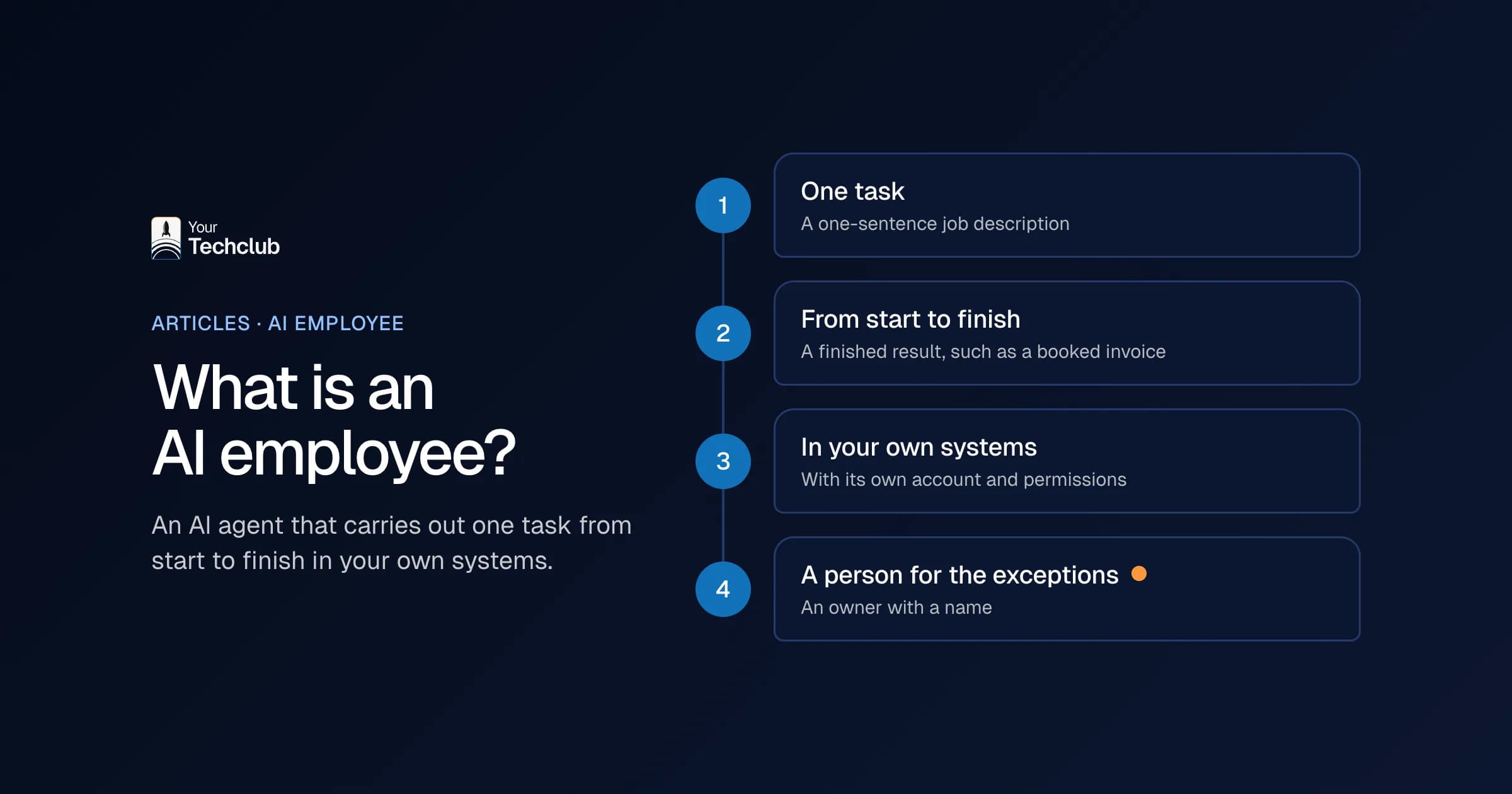
An AI employee is an AI agent that fully carries out one clearly defined task within your existing systems, such as your mailbox, CRM or accounting software. It works independently according to fixed agreements and records every step. When in doubt, with an exception or with a decision that carries risk, it passes the work to a person.
Four things make something an AI employee:
- One task. Not "help the sales support team", but "process every incoming order and enter it as an order in the ERP".
- From start to finish. It delivers a finished result, such as a booked invoice or a scheduled candidate.
- In your own systems. Through integrations with, for example, Exact Online, AFAS, HubSpot or Microsoft 365, with its own account and its own permissions. Exact Online and AFAS are the accounting and ERP packages most Dutch companies run on.
- With a person for the exceptions. Someone at your company is the owner. That person gets the cases that fall outside the agreements and keeps an eye on the results.
My rule of thumb: an AI employee has a one-sentence job description. If the task does not fit in one sentence, you are talking about two AI employees.
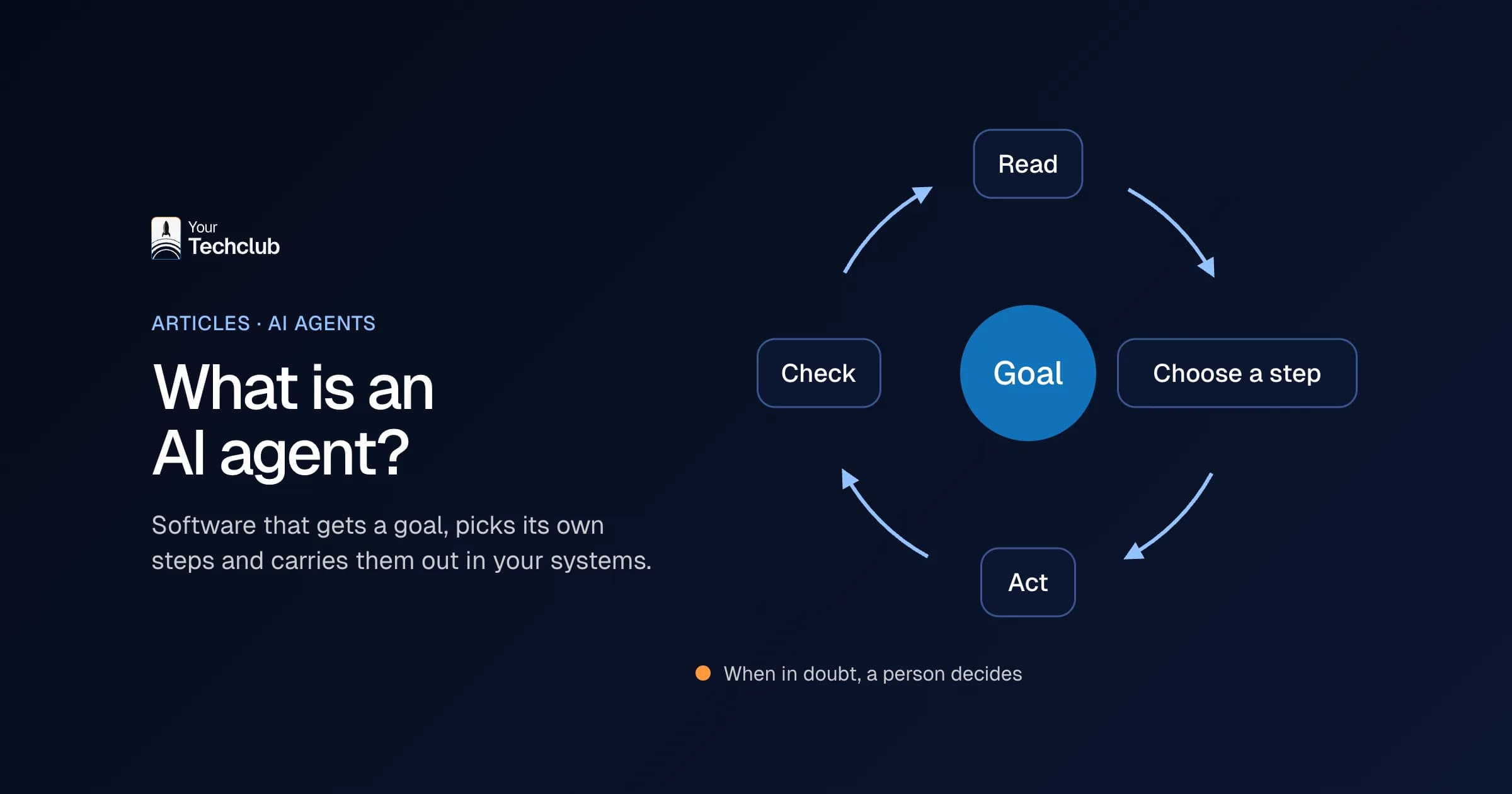
Under the bonnet it is an AI agent: a language model with instructions, access to a few systems and a log. How that works technically, you can read in what is an AI agent. Still, I prefer to call it an AI employee. Directors think in tasks and people, not in models. Besides, the word forces you to ask the right questions: what is its task, who is its manager and what is it not allowed to do?
How does it differ from a chatbot, RPA and an AI assistant?
A chatbot answers questions, an AI assistant helps one person work faster and RPA follows a fixed script. An AI employee does a whole task on its own, even when the input is different every time, and works in your systems while doing so. So the difference is in who finishes the work: the software or your colleague.
| Chatbot | RPA or workflow | AI assistant | AI employee | |
|---|---|---|---|---|
| What it does | answers questions in a chat window | carries out fixed steps, click by click | helps one person write, search and summarise | carries out one task from start to finish |
| Who starts it | someone asking a question | a trigger or a fixed time | the employee, every time again | an event: an email, a form, a new line in your CRM |
| Handling variation | within the conversation | poor: a different PDF format and the script stops | good, but the person decides | good, and when in doubt it goes to a person |
| Works in your systems | usually read-only | yes, but only according to the script | limited, through the user's apps | yes, with its own permissions and a log |
| Who finishes the work | the person | the script, as long as nothing changes | the person | the AI employee; the person handles the exceptions |
The biggest misunderstanding? That an AI employee is a smarter chatbot. A chatbot waits until someone asks something. An AI employee does not wait for anything: the email comes in and it gets to work.
RPA and workflow tools such as Power Automate or n8n are actually very useful, as long as the input is predictable. That is why we often build an AI employee on top of such a workflow. We then only use AI for the step that requires reading or judging. I explain the difference in RPA vs AI and in AI agent vs automation.
And an AI assistant, such as Copilot in Outlook? It makes one person faster, and that is fine. But that person still does the task. With an AI employee, the task itself moves.
What does a working day of an AI employee look like?
An AI employee works in short rounds: something comes in, it processes it, records it and reports the exceptions. Below is an order processor at a wholesaler. This is a composite example to show how it works, not a client case. So the times and numbers are illustrative too.
- 07:02 The shared mailbox holds 14 orders from overnight. It reads them, recognises the customer in each email and looks up the item numbers.
- 07:09 Twelve orders are in the ERP as drafts. Two are not. One email contains an item that is no longer available, and the other customer quotes a different price from the price list.
- 07:10 Those two go to the sales support team, with the email, what it has already found and a proposal.
- 08:30 The sales support team starts the day with two decisions instead of retyping 14 orders.
- All day Every new order follows the same round. Everything goes into a log: which email, which choice, which change in the ERP.
- 17:00 The team leader receives a short daily summary with the number of orders, the number of exceptions and the reason for each exception.
Notice something? The sales support team does not get less responsibility, but different work: deciding instead of retyping. That shift is exactly what decides whether a team accepts the new colleague. You can see what such an order processor looks like under order entry automation.
AI employee or hiring a new employee: which is smarter?
Choose an AI employee if the work is mostly repetition, in fixed systems, with clear rules. Hire a person if the work is about judgement, customer contact or constantly new tasks. Often the answer is both: the AI employee takes away the routine, so the vacancy becomes smaller or is only needed later.
This is how I put the two side by side. You fill in the amounts yourself, or we fill them in together during the audit.
| Hiring a new employee | AI employee | |
|---|---|---|
| Time to the first working day | recruitment, interviews and notice period: [fill in: your average time to hire] | audit of 5 working days; the report covers what the implementation looks like and the plan for the first 90 days |
| Upfront costs | recruitment and onboarding: € [fill in] | audit at a fixed price, with our guarantee, and the build: see what AI agent development costs |
| Costs per year | labour costs per hour worked; on average € 45 in 2024 according to CBS (Statistics Netherlands) | maintenance and use of the language model; the audit works this out per task as well |
| Onboarding | weeks of shadowing a colleague | instructions, a test set with real examples and first a period with human approval |
| Busy periods and peaks | fixed hours; a peak means overtime or temps | handles more volume without overtime, within its one task |
| Holidays and sickness | yes | no, but outages when a connected system changes |
| Judgement, customer contact, new tasks | strong | weak: it only does its own task |
| If it disappoints | probation, notice period, conversations | switch it off; the build costs are gone |
| Who manages it | a manager | an owner with a name |
Worked example: 30 hours of retyping a week
This is a worked example, not a client case. A sales support team spends 30 hours a week retyping orders from email. The director is considering an extra colleague for 0.8 FTE.
- What the work costs now. 30 hours times 46 working weeks is 1,380 hours a year. With CBS average labour costs of € 45 per hour worked, that is € 62,100 a year (CBS, 15 October 2025).
- What an AI employee takes over. Suppose 70% of this work is routine: regular customers, regular item numbers. Then the theoretical gain is 966 hours. If I calculate cautiously with 50 to 90 percent of that, 483 to 869 hours remain, or € 21,700 to € 39,100 a year.
- What is left for a person. Between 511 and 897 hours a year of exceptions and customer contact.
The conclusion in this example: the AI employee does not fully replace the vacancy. It does take away the most boring part. Perhaps a colleague for 0.4 FTE is then enough, or the vacancy does not need to open until next year. That sum only works if the costs of build and maintenance stay below the low estimate. Run your own tasks through the manual work calculator.
What I would not do: cut a vacancy before the AI employee has run stably for three months. Prove it first, and only then adjust your headcount.
What you often see when you write out the tasks of such a vacancy: part of it is customer contact and judgement, part of it is retyping. Then the honest question is not "person or software", but which part of the work you hand over first.
Which AI employees are there per department?
Almost every department has suitable tasks: lots of repetition, fixed systems and a clear end result. Our catalogue contains 62 worked-out AI employees, spread across sales, finance, HR and operations, among others. Below, per department, is where the time usually goes, with examples for staffing, business services and B2B.
Sales
In sales the time mainly goes into following up and updating. A lead follow-up AI employee responds to an enquiry within minutes and schedules a call. More examples are under AI in sales.
Finance
Finance is often the easiest place to start, because the rules are clear and the systems have good integrations. Think of invoice processing that matches purchase invoices against the order, or accounts receivable automation that prepares reminders. Everything is under AI in finance.
HR
In HR, an AI employee mainly helps with admin, such as sickness absence administration or employee onboarding automation that arranges accounts and documents. AI that selects candidates counts as high-risk AI under the EU AI Act. So a person always decides there. See AI in HR.
Operations
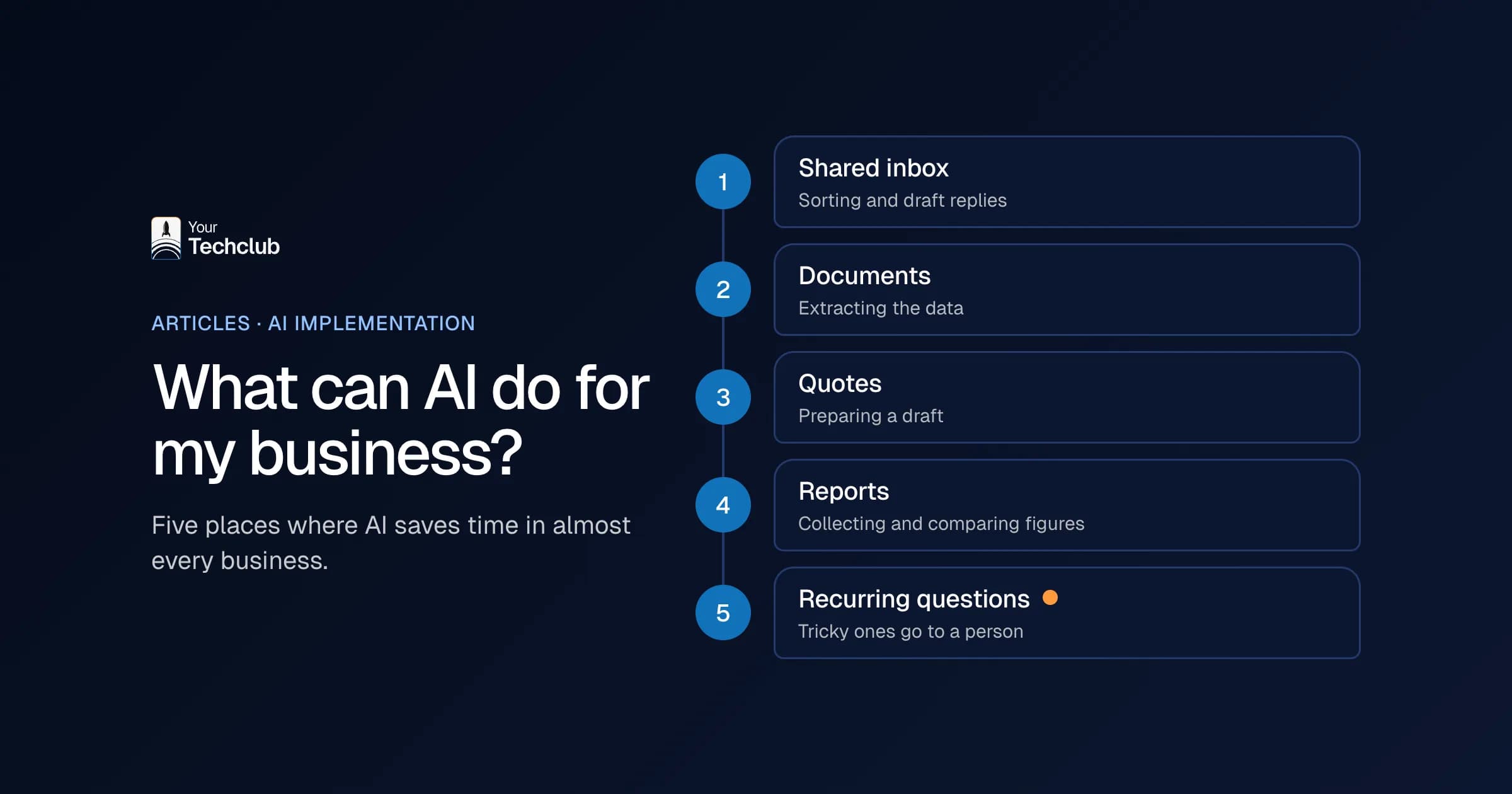
Operations is the catch-all for everything that falls between departments. Shared inbox triage sorts the shared mailbox and prepares draft replies. Document data extraction reads PDFs and scans. The rest is under automating operational processes.
Do you work in staffing? Then the gain is often between placement and invoice, as you can read in staffing agency automation. All 62 examples are in the catalogue of AI employees.
How do you choose your first AI employee?
Choose a task that takes a lot of hours, carries little risk and runs on clean data. Lots of hours, because then you quickly see whether it pays off. Little risk, because a mistake then does not hit a customer or a salary. Clean data, because an AI employee never works better than the data it works with.
This is how you test every candidate task:
- Lots of hours. Count them. 300 times a week at 6 minutes is 30 hours.
- Little risk. What happens if it gets it wrong once? A wrongly labelled email is annoying. An invoice paid twice means a conversation with your accountant.
- Clean data. Is the data in one place, and is it correct? A CRM full of duplicate companies produces an AI employee that does double work.
Give each task 1 to 5 points per criterion and start with the highest total. This is what that looks like in an example (fictional, to show the method):
| Candidate task | Hours | Risk (5 = low) | Data | Total |
|---|---|---|---|---|
| Retyping purchase orders | 5 | 4 | 4 | 13 |
| Sorting the shared mailbox | 4 | 5 | 3 | 12 |
| Writing 40-page proposals | 3 | 2 | 2 | 7 |
| Making payments | 2 | 1 | 4 | 7 |
The task that sounds most exciting is almost never at the top of a table like this. That is no coincidence: exciting tasks require judgement, boring tasks only require time.
Familiar: a director wants to start with the 40-page proposals, because that makes the biggest impression. My advice then is to start with the task at the top of the table. It frees up hours sooner, and you learn how an AI employee works in your systems.
Want to put this on paper yourself first? Then download the blueprint for your first AI employee (in Dutch). With it you work out one task, including the systems, the exceptions and the owner.
How do you get from audit to a working AI employee?
The route has three steps. First the AI Opportunity Audit: in 5 working days we work out which tasks deliver the most, with a fixed report as the outcome. Then we build the first AI employee on the best candidate. After that comes ongoing management, so that it keeps working when your systems or processes change.
Step 1: the audit
Our motto is "Opportunity first. Then the technology." The AI Opportunity Audit takes 5 working days and ends with a fixed report. It shows which tasks deliver the most, but also where AI is not a good idea. The audit may even conclude "build nothing". The report is yours, so you can also carry it out with another party.
Step 2: the first AI employee
Then we build the task with the highest score. My advice: let it prepare the work for a few weeks while a person approves every step. Only when the exceptions become predictable does it get more room. That way your team learns to trust it, and you see mistakes before a customer does. How we approach this, you can read under AI implementation.
Step 3: management
Then the real work begins. Suppliers change their software, language models get new versions and your own process changes too. An AI employee without an owner and management is, after six months, a pilot nobody dares to switch on any more. Why so many projects stall there, you can read in why AI pilots fail.
What should an AI employee not do?
An AI employee should not take decisions with major consequences for people, such as rejecting a candidate or terminating a contract. It also does not transfer money without a check and does not do tasks you cannot explain yourself. Not sure whether something is allowed? Then let a person decide and let it do the groundwork.
What I would not do:
- Let it make payments without a second pair of eyes. Preparing them is fine; a person presses the button.
- Reject candidates automatically. That counts as high risk under the EU AI Act, and it is simply not a good idea either.
- Automate a process nobody understands. Then you automate the chaos, only faster.
- Let customers think they are talking to a person. That is unfair, and since 2 August 2026 it also breaks the transparency rules.
- Give it access to everything "because that is easier". That is exactly the reason not to.
An example from our own work. For an organisation in the Dutch staffing sector we built an AI assistant that pre-fills a long pay-equality form from the collective labour agreement and the company's own policies. We deliberately kept two things away from the AI. If an answer is not in the documents, the field stays empty instead of the AI filling something in. And an employee checks every answer before the form goes to the archive. A missed allowance, after all, feeds straight into what a temporary worker gets paid. See the AI assistant that shows the source for every answer.
More situations in which you are better off not using AI are in when not to use AI.
How do you arrange management, logging and permissions?
Treat an AI employee as a new colleague with its own account. Give it only the permissions it needs for its task, log every action and appoint an owner who reviews the exceptions and results. That way you can always see what it did, why it did it and with which instructions.
Go through this checklist before the first working day:
- Its own account. Never a colleague's account. Then you can see in every system who did what.
- Minimum permissions. The order processor may create orders, but not change prices.
- A log per action. What came in, what did it decide, what changed, and which version of the instructions applied at that moment?
- An owner with a name. Not a department, because a department does not answer the phone.
- An off switch. Someone has to be able to stop it in a single action.
- Testing with every change. If you change the instructions, test on a fixed set of examples first.
What that looks like with several AI employees at once, you can see in an overview in which every AI agent has an assignment, limits and a log.
Does it read email from outside? Then someone can try to make it do something else with a cleverly worded text. That is called prompt injection, and minimum permissions are the best insurance against it. Your Tech Club is certified by Kiwa for ISO 27001 and ISO 9001. How to record these kinds of agreements across your whole company, you can read in AI governance for SMEs.
What do the GDPR and the EU AI Act say about an AI employee?
If an AI employee processes personal data, the GDPR simply applies: a clear purpose, a legal basis, no more data than necessary and agreements with suppliers. On top of that, the EU AI Act asks you to work on the AI literacy of your people and to be honest when someone is communicating with AI. Stricter rules apply to decisions about staff.
I am not a lawyer, so this is not legal advice. These are, however, the points that come up with almost every AI employee:
- AI literacy. According to Article 4 of the EU AI Act (Regulation (EU) 2024/1689), organisations have had to take measures since 2 February 2025 so that their people know enough about AI. That also applies to the owner of your AI employee. See the AI literacy requirement.
- Transparency. Article 50 has applied since 2 August 2026: people must know they are communicating with an AI system, unless that is already obvious.
- High risk. AI that helps with recruitment and selection is listed in Annex III of the regulation. Extra requirements apply there, such as human oversight. Because of the digital omnibus of July 2026, those requirements only apply from 2 December 2027, but I would build for them now.
- No decision without a person. Article 22 of the GDPR gives people the right not to be subject to a decision based solely on automated processing that significantly affects them.
That sounds heavy, but for most tasks it is manageable. An AI employee that books purchase invoices hardly touches personal data. Everything about both laws is in EU AI Act and GDPR: what to sort out.
How do you measure whether an AI employee pays off?
Before the start, measure how much time the task takes, how long it takes from start to finish and how often it goes wrong. Afterwards, measure the same, plus the share of exceptions that still go to a person. The difference in hours, lead time and errors, minus the costs of build and maintenance, is what an AI employee delivers.
| What you measure | How you measure it | Why |
|---|---|---|
| Hours per week | tally sheet for two weeks before the start, then from the log | this is the basis of your business case |
| Lead time | time between arrival and finished result | customers notice speed before savings |
| Error rate | sample of, for example, 50 completed tasks per month | faster must not mean sloppier |
| Exception rate | share of tasks that go to a person | shows whether the task and the data are right |
| Costs | build, maintenance and use of the language model | without this number every saving is just a story |
The exception rate is the share of tasks that the AI employee passes on to a person. If it does not fall in the first months, the task or the data is not right. It is also the most underestimated number.
Do the baseline measurement properly, not from memory. Everyone remembers the busy days, so estimates usually come out too high. Want to do the sum? Then use the AI ROI model (in Dutch) or read the AI business case calculation.
My advice: before go-live, write down at which exception rate and which number of hours per week you will be satisfied. Then after a few months you decide on figures, not on gut feeling.
Is an AI employee right for your business?
An AI employee suits you if there is work that comes back every week, in systems with integrations, and if someone is willing to become its owner. Do you mainly have one-off questions or one-off jobs? Then an AI assistant or an AI workshop helps more. In doubt? Start by counting: how many hours go to work nobody enjoys?
My advice is always the same. Do not start with the question of which AI you want. Start with the question of which task you no longer want a person doing in three months. That seems a small shift, but it decides whether you buy a demo or hire a colleague. How AI fits into your whole company, you can read in AI implementation in SMEs.
Frequently asked questions
Is an AI employee the same as an AI agent?
Almost. An AI employee is an AI agent with one fixed task, its own account, an owner and a log. AI agent is the technical term; AI employee describes the role in your company. You can read more about the technology in what is an AI agent.
Is an AI employee cheaper than a new employee?
Often for repetitive work, not for work involving judgement and customer contact. Compare the hours it really takes over with the costs of build and maintenance, and calculate with a cautious estimate. Usually it makes a vacancy smaller rather than unnecessary.
Does an AI employee replace my staff?
It replaces tasks, not people. The hours that are freed up usually go to work you do not get round to now, such as calling customers or clearing backlogs. Whether you need fewer people is your choice, not the software's.
Do I need my own IT department for a digital AI employee?
No. You do need someone who owns the task and handles the exceptions. That is usually someone from the department where the work is. See also AI implementation without an IT department.
Which systems can an AI employee work with?
With any system that has an integration (API), such as Exact Online, AFAS, HubSpot or Microsoft 365. We integrate with 24 systems; the overview is on integrations. If your system has no integration, we look in the audit at whether there is a way round it.
Sources
- CBS, 15 October 2025, CBS
- EU AI Act (Regulation (EU) 2024/1689), EUR-Lex
- GDPR, EUR-Lex